Summary: In Part 2, we changed the frontend authentication methods and watched the browser behavior change with them. In this part, the frontend stays on the normal FBA configuration while we change only the backend OWA authentication settings. The goal is to separate “the user authenticated at the frontend” from “the request reached the backend successfully.”
A user can enter valid credentials and still be returned to the Exchange OWA logon page because the failure happened after frontend authentication. This part shows how to prove where the failure occurs instead of assuming the password or the frontend authentication method is the problem.
As with the rest of this series, the controlled lab is used to understand the production impact of a change before that change is ever needed in a real environment. That is especially important here because frontend and backend OWA authentication serve different roles, and an apparently simple backend change can affect the proxied request path in ways that are not obvious from the browser. Microsoft documents different default authentication settings for the frontend and backend OWA applications, and also states that backend virtual directories should not normally be configured by administrators. The changes below are used only to understand that behavior. Microsoft Learn: Default settings for Exchange virtual directories
1. Starting Point: Frontend and Backend Are Not Configured the Same Way
The frontend OWA configuration was left on the normal FBA baseline:
Default Web Site\owa

Exchange FBA           : Enabled
Basic Authentication   : Enabled
Windows Authentication : Disabled
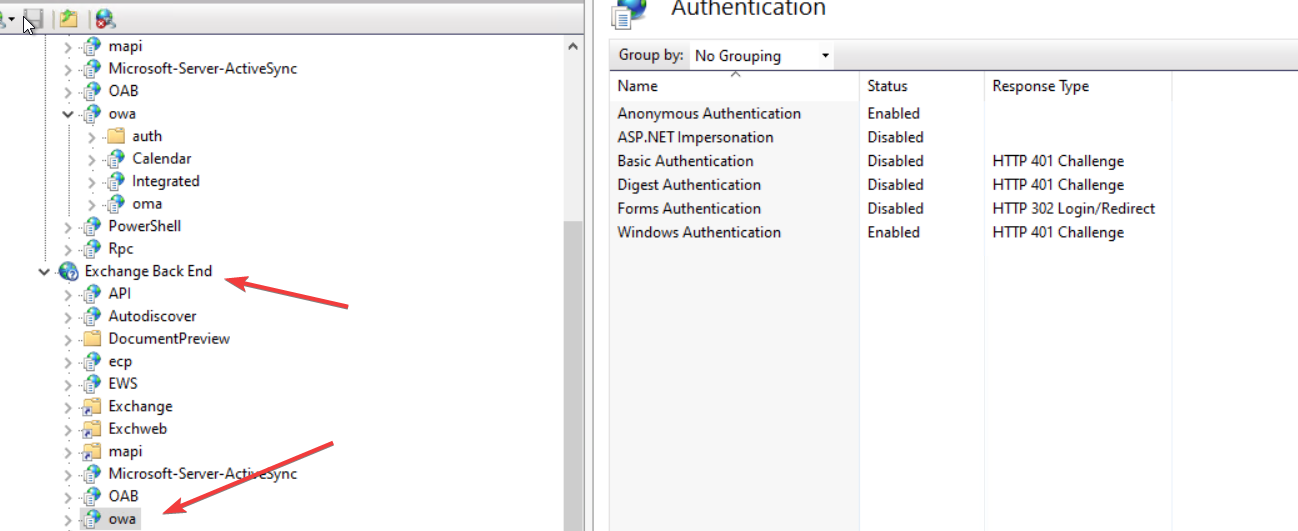
The backend OWA application had the documented default combination:
Exchange Back End\owa

Anonymous Authentication : Enabled
Windows Authentication   : Enabled
Basic Authentication     : Disabled
Figure 1 – Default authentication state on Exchange Back End\owa: Anonymous and Windows Authentication enabled.
That difference matters. The browser signs in through the frontend, but Exchange still has to proxy the authenticated request to the backend OWA application on the backend HTTPS site.
I used the WebAdministration module to verify the two backend settings before each test:
PowerShell
Import-Module WebAdministrationGet-WebConfigurationProperty-PSPath 'IIS:\'-Location 'Exchange Back End/owa'-Filter 'system.webServer/security/authentication/anonymousAuthentication'-Name enabledGet-WebConfigurationProperty-PSPath 'IIS:\'-Location 'Exchange Back End/owa'-Filter 'system.webServer/security/authentication/windowsAuthentication'-Name enabled
2. What We Are Testing
Test
Backend Anonymous
Backend Windows
Result
Baseline
Enabled
Enabled
OWA works
Test A
Disabled
Enabled
OWA still works in the tested flow
Test B
Enabled
Disabled
Frontend accepts FBA, backend returns 401
The important point is that the frontend configuration does not change during these tests. Only the backend OWA authentication state changes.
3. Test A – Disable Backend Anonymous Authentication
For the first backend test, I disabled Anonymous Authentication and left Windows Authentication enabled.
PowerShell
Set-WebConfigurationProperty-PSPath 'IIS:\'-Location 'Exchange Back End/owa'-Filter 'system.webServer/security/authentication/anonymousAuthentication'-Name enabled -Value $falseSet-WebConfigurationProperty-PSPath 'IIS:\'-Location 'Exchange Back End/owa'-Filter 'system.webServer/security/authentication/windowsAuthentication'-Name enabled -Value $true
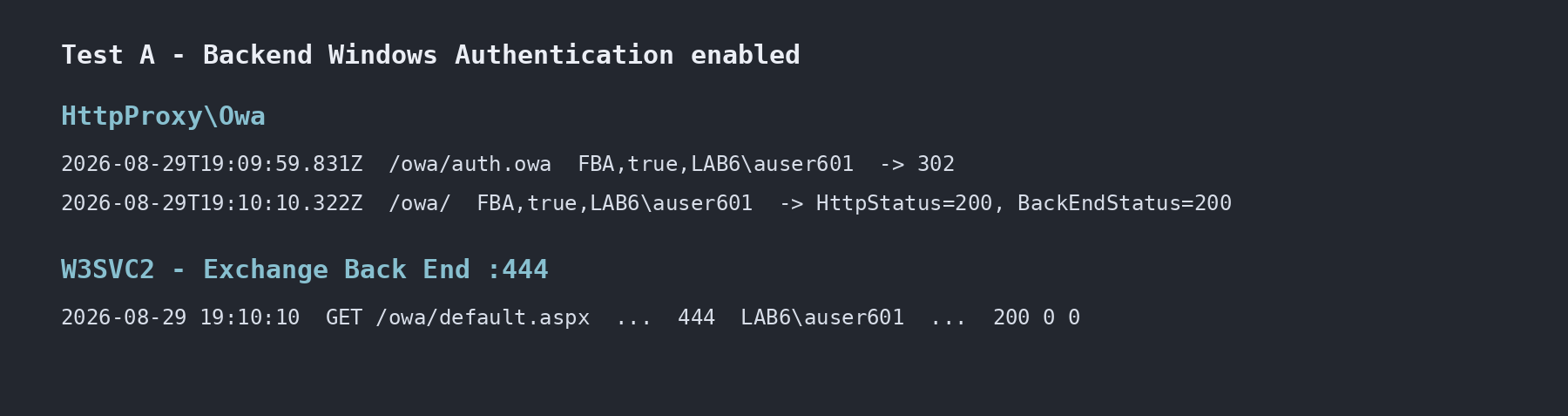
The browser still displayed the normal Exchange FBA page, valid credentials were accepted, and OWA opened successfully.
The backend IIS log showed the authenticated user reaching /owa/default.aspx on port 444 and receiving HTTP 200:
/owa/default.aspx 444 LAB6\auser601 200
The backend self-test endpoint also continued to answer successfully:
/owa/exhealth.check 444 - 200
Figure 2 – Test A: the authenticated user reached the backend and the proxied OWA request completed with HTTP 200.
The dash in cs-username is worth noting. It does not prove Anonymous Authentication was used. In this test Anonymous Authentication was disabled, yet exhealth.check still returned 200 with no username logged.
So the result of Test A is narrow but useful: the tested interactive FBA flow and the backend self-test still worked with backend Anonymous disabled as long as backend Windows Authentication remained enabled.
That does not turn “Anonymous disabled” into a recommended configuration. It only tells us that Anonymous was not required for those specific captured requests.
4. Test B – Disable Backend Windows Authentication
The second test is the one that makes the frontend/backend boundary much clearer. I restored Anonymous Authentication and disabled Windows Authentication on the backend OWA application.
PowerShell
Set-WebConfigurationProperty-PSPath 'IIS:\'-Location 'Exchange Back End/owa'-Filter 'system.webServer/security/authentication/anonymousAuthentication'-Name enabled -Value $trueSet-WebConfigurationProperty-PSPath 'IIS:\'-Location 'Exchange Back End/owa'-Filter 'system.webServer/security/authentication/windowsAuthentication'-Name enabled -Value $false
The user still received the normal Exchange FBA sign-in page and entered valid credentials. The important clue came immediately after that.
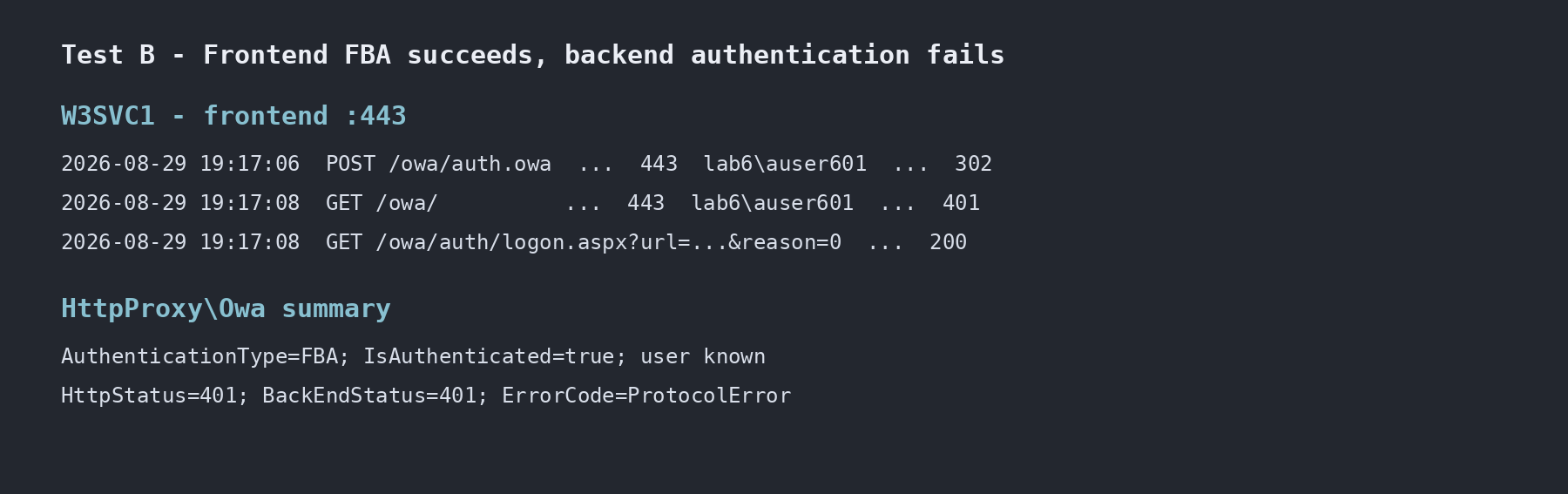
The frontend request to /owa/auth.owa returned 302, but the next request to OWA failed and the browser was redirected back to the logon page with reason=0.
POST /owa/auth.owa     → 302
GET  /owa/             → 401
GET  /owa/auth/logon.aspx?...reason=0...
This is different from an invalid password test, where the later logon request used reason=2. Here the credentials had already been accepted at the frontend. The failure happened when Exchange tried to continue the request through the backend path.
5. HttpProxy Makes the Failure Boundary Much Clearer
The OWA HttpProxy log still knew who the user was:
Figure 3 – Test B: frontend FBA identified the user, but the proxied backend request failed with HTTP 401.
This combination is much more useful than looking at the browser alone. The frontend authentication state was valid, but the proxied backend request failed with 401.
The backend W3SVC2 log showed the same boundary from the IIS side:
/owa/ 444 - 401
No authenticated username reached the backend OWA application in that failed request.
In this captured flow, backend Anonymous Authentication by itself was not enough to carry the authenticated OWA user context. Restoring backend Windows Authentication allowed the normal FBA flow to complete again.
6. Why This Matters During Troubleshooting
A browser can show the correct OWA sign-in page, accept a valid username and password, and still fail after authentication.
That is why I separate three questions:
Did the browser reach the frontend?
        ↓
Did the frontend accept the credentials?
        ↓
Did the authenticated request complete on the backend?
If only the first two are checked, a backend authentication problem can look like an ordinary OWA login problem.
The reason value also needs context. In these tests:
reason=2  → bad password test
reason=0  → frontend FBA succeeded, backend path failed
I would not treat those numbers as a complete error-code catalog. They are useful because we captured the surrounding IIS and HttpProxy evidence at the same time.
7. Restore the Microsoft Default Backend Authentication State
After the A/B tests, I restored both documented backend defaults:
PowerShell
Set-WebConfigurationProperty-PSPath 'IIS:\'-Location 'Exchange Back End/owa'-Filter 'system.webServer/security/authentication/anonymousAuthentication'-Name enabled -Value $trueSet-WebConfigurationProperty-PSPath 'IIS:\'-Location 'Exchange Back End/owa'-Filter 'system.webServer/security/authentication/windowsAuthentication'-Name enabled -Value $true
I then verified that the normal FBA login worked again.
8. Production Note: Do Not Redesign Backend OWA Authentication from This Lab Result
Test A may look tempting because OWA worked with Anonymous Authentication disabled. I would not use that as a production recommendation.
The Microsoft default for Exchange Back End\owa is Anonymous Authentication enabled together with Windows Authentication enabled, and Microsoft explicitly advises against manually configuring backend virtual directories as part of normal administration.
The backend HTTPS listener on port 444 is an internal Exchange backend boundary. It should not be exposed as the client-facing OWA endpoint; external publishing should terminate on the normal frontend path.
The useful lesson is not “disable Anonymous.” The useful lesson is that different backend requests can use the authentication configuration differently, and the presence of a 200 response with cs-username=- does not prove which authentication provider handled that request.
9. Key Takeaways
Frontend FBA success does not guarantee backend OWA success.
With backend Anonymous disabled and Windows enabled, the tested FBA flow still succeeded and the user appeared in W3SVC2 with HTTP 200.
The backend /owa/exhealth.check endpoint still returned 200 with cs-username=- even while Anonymous Authentication was disabled.
With backend Windows Authentication disabled, the frontend still accepted valid FBA credentials, but the backend returned 401.
HttpProxy preserved the authenticated user context while showing HttpStatus=401 and BackEndStatus=401, which clearly located the failure after frontend authentication.
A single HTTP status or a single IIS username field is not enough to explain an OWA authentication failure.
Next: follow the same request through the logs
Part 4 takes the same type of tests and focuses on the evidence: frontend W3SVC1, Exchange HttpProxy OWA logs, and backend W3SVC2. It compares successful FBA, invalid credentials, and backend authentication failures side by side.
Exchange Server OWA Authentication Deep Dive Series
I’m a Cloud Solution Architect – Global Delivery at Microsoft, working within the Modern Work team. My areas of expertise include Exchange Server (on-premises), Exchange Hybrid, Exchange Online, Microsoft 365, security, identity, and enterprise infrastructure.