Windows 11 25H2 to 26H2 Upgrade: First Impressions

Windows 11 25H2 to 26H2 Upgrade: First Impressions

Windows 11, Windows Client
Applies to: Windows 11 26H2; upgrade from Windows 11 25H2 On September 23, 2026, Windows 11 version 26H2 appeared in Windows Update on my Windows 11 Enterprise laptop. I decided to upgrade from Windows 11 25H2, OS Build 26200.9448, to 26H2 and document the process. After the upgrade, I also checked some of the newer Windows features to see what had actually changed and how they worked in daily use. This article is based on my experience with Windows 11 Enterprise. Some features or options may be different on other editions or device configurations, and Windows features can change with future updates. I may update this article as I continue using 26H2. In This Article 1. Upgrading from Windows 11 25H2 to 26H2 2. Upgrade Experience 3. Taskbar Position and…
Read More
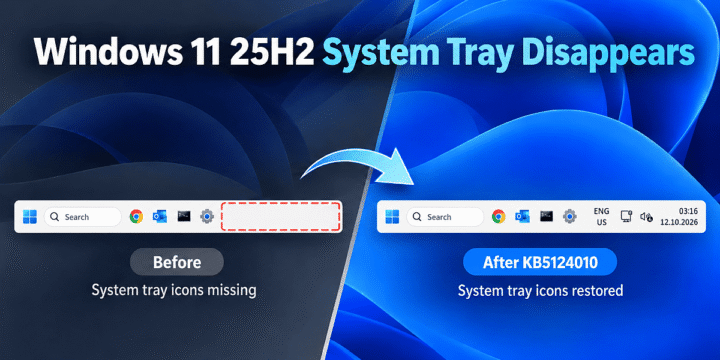
Windows 11 25H2 System Tray Disappears After KB5121003 and KB5120998 – Reproduced and Tested

Windows 11 25H2 System Tray Disappears After KB5121003 and KB5120998 – Reproduced and Tested

Windows 11, Windows Client
Applies to: Windows 11 25H2 Summary: On a Windows 11 25H2 test VM, the entire system tray disappeared after installing KB5121003 and disappeared again after installing the later KB5120998 cumulative preview. Removing KB5121003 rolled the VM back to OS Build 26200.8037 and immediately restored the clock, network, volume and notification area. This post documents the reproduction, rollback, temporary block and the follow-up test with KB5120998. This is a controlled reproduction on one Windows 11 25H2 VM, not a claim that every Windows 11 25H2 device will experience the same problem. At the time of writing, Microsoft does not list this exact whole-system-tray symptom as a known issue for KB5121003. In This Article 1. Environment and Starting Point 2. What the Problem Looked Like 3. Roll Back KB5121003 4. Result After…
Read More
Wake on LAN Stops Working After a Windows 10 Upgrade

Wake on LAN Stops Working After a Windows 10 Upgrade

Archive / Legacy Topics, Windows 10, Windows Client
Applies to: Windows 10 Wake on LAN (WOL) stopped working on one of my systems after upgrading from Windows 8.1 to Windows 10. The system used an onboard Realtek PCIe GBE Family Controller. In this case, the problem was the network adapter driver installed after the Windows upgrade. Replacing it with the Realtek vendor driver restored WOL. This was the finding in this specific system, not a general rule for every Windows 10 WOL problem. In This Article 1. Original Environment 2. Check the WOL Power State 3. Verify Network Adapter Settings 4. Check the Network Adapter Driver 5. What Fixed It in This System 6. Key Takeaways 1. Original Environment Previous OS: Windows 8.1 Pro x64 Current OS: Windows 10 Pro x64 Mainboard: ASUS H87-Plus NIC: Onboard Realtek PCIe…
Read More
Fix SSTP VPN Error 0x80092013: Revocation Server Offline

Fix SSTP VPN Error 0x80092013: Revocation Server Offline

Security, Windows Client
Applies to: Windows 11 / Windows 10 / Windows 8.1 / Windows 8 / Windows 7 / Windows Vista When a Windows SSTP VPN client validates the VPN server certificate, it also checks whether the certificate has been revoked. If the Certificate Revocation List (CRL) cannot be reached, the connection can fail with: Error 0x80092013 — The revocation function was unable to check revocation because the revocation server was offline. In This Article 1. What Error 0x80092013 Means 2. Check the CRL Distribution Point 3. Clear the Certificate URL Cache 4. Temporary Troubleshooting Workaround 5. Key Takeaways 1. What Error 0x80092013 Means 0x80092013 maps to CRYPT_E_REVOCATION_OFFLINE. The client is unable to complete the certificate revocation check. Common causes include: The CRL Distribution Point (CDP) URL in the certificate is not…
Read More

How to Repair an Outlook PST File with ScanPST

Windows Client
Applies to: Classic Outlook for Microsoft 365 / Outlook 2024 / 2021 / 2019 / 2016 / 2013 / 2010 / 2007 / 2003 The Microsoft Outlook Inbox Repair Tool, SCANPST.EXE, checks Outlook data files for structural errors and can repair many problems in damaged .pst files. The original version of this article was written for Outlook 2010. ScanPST is still included with current classic Outlook releases, although its installation path can vary by Outlook version and Office installation type. In This Article 1. Before You Start 2. Find SCANPST.EXE 3. Scan and Repair the PST File 4. Review Recovered Items 5. PST Versus OST Files 6. Key Takeaways 1. Before You Start Close Outlook before running ScanPST. Back up the Outlook data file before attempting a repair. Make sure…
Read More
How to Disable Negative DNS Caching on Windows Clients

How to Disable Negative DNS Caching on Windows Clients

Windows Client
Applies to: Windows 11 / Windows 10 / Windows 8.1 / Windows 8 / Windows 7 / Windows Vista Windows DNS clients cache both successful and unsuccessful DNS responses. A cached negative response can temporarily prevent name resolution even after the DNS record becomes available. In most cases, you should troubleshoot the DNS response and clear the resolver cache first. Disabling negative DNS caching should be used only for specific troubleshooting scenarios where cached failures are causing repeated resolution problems. In This Article 1. What Negative DNS Caching Does 2. Check the DNS Client Cache 3. Clear the DNS Cache First 4. Disable Negative DNS Caching 5. When Not to Disable It 6. Key Takeaways 1. What Negative DNS Caching Does When a DNS query returns a negative result, Windows…
Read More