Applies to: Windows 11 / Windows 10 / Windows 8.1 / Windows 8 / Windows 7 / Windows Vista
When a Windows SSTP VPN client validates the VPN server certificate, it also checks whether the certificate has been revoked. If the Certificate Revocation List (CRL) cannot be reached, the connection can fail with:
Error 0x80092013 — The revocation function was unable to check revocation because the revocation server was offline.

In This Article
- 1. What Error 0x80092013 Means
- 2. Check the CRL Distribution Point
- 3. Clear the Certificate URL Cache
- 4. Temporary Troubleshooting Workaround
- 5. Key Takeaways
1. What Error 0x80092013 Means
0x80092013 maps to CRYPT_E_REVOCATION_OFFLINE. The client is unable to complete the certificate revocation check.
Common causes include:
- The CRL Distribution Point (CDP) URL in the certificate is not reachable from the VPN client.
- The CRL has not been published.
- The published CRL has expired.
- The client is using stale revocation information from its local cache.
- A proxy, firewall, DNS, or routing issue prevents access to the CRL location.
2. Check the CRL Distribution Point
Open the SSTP server certificate and review the CRL Distribution Points extension. The listed HTTP or LDAP locations must be reachable from the client during certificate validation.
You can also export the server certificate and test certificate chain and revocation retrieval with:
certutil -verify -urlfetch server.cerFor Internet-based SSTP clients, an HTTP CRL location that is publicly reachable is normally the practical design. Avoid publishing only an internal hostname that external clients cannot resolve or reach.
3. Clear the Certificate URL Cache
If the CRL is valid and reachable but the client still reports the error, clear the cached certificate URL data and retry:
certutil -urlcache * delete
certutil -setreg chain\ChainCacheResyncFiletime @now
If the problem continues, review the Microsoft-Windows-CAPI2/Operational log in Event Viewer for certificate chain and revocation details.
4. Temporary Troubleshooting Workaround
Windows SSTP clients expose a registry value that can skip certificate revocation checking during SSL negotiation:
HKEY_LOCAL_MACHINE\SYSTEM\CurrentControlSet\Services\SstpSvc\Parameters

DWORD: NoCertRevocationCheck
Value: 1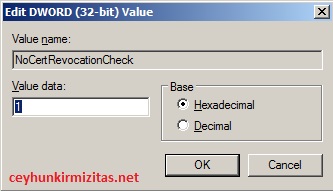
Do not use this as the production fix. Microsoft documents this value for debugging. Setting it to 1 causes the SSTP client to skip revocation checking, which means a revoked VPN server certificate could still be accepted.
Use it only to confirm that revocation checking is the cause of the connection failure. After troubleshooting, remove the value or set it back to 0 and fix CRL publication or reachability.
5. Key Takeaways
- Error 0x80092013 means Windows cannot complete the certificate revocation check.
- Check the certificate’s CRL Distribution Point before changing client security settings.
- Verify that the CRL is published, current, and reachable from the SSTP client.
- Clear cached revocation data when the CRL has recently changed.
- NoCertRevocationCheck should be used only as a temporary troubleshooting test, not as the permanent solution.
References
- Microsoft Learn – Error 0x80092013 and certificate revocation checks
- Microsoft Learn – VPN certificate revocation and CRL validation

Cloud and infrastructure professional with nearly two decades of experience in enterprise IT environments, spanning public cloud, private cloud, and hybrid architectures.