Applies to: Microsoft Entra ID | Microsoft Entra Connect Pass-through Authentication | Multi-Forest Active Directory
Microsoft Entra Pass-through Authentication (PTA) allows users to sign in to Microsoft Entra ID using passwords that are validated directly against on-premises Active Directory.
In a single Active Directory forest, this password validation path is usually straightforward. In a multi-forest environment, however, the PTA agent may need to validate users located in another forest through an Active Directory forest trust.
In this scenario, the PTA agent itself can be healthy and successfully validate users in one forest, while Microsoft Entra sign-ins for users in another forest fail through the same agent.
In this article, we will look at how Forest Trust and Name Suffix Routing can affect cross-forest password validation with Microsoft Entra Pass-through Authentication.
In This Article
- 1. Scenario
- 2. Name Suffix Routing
- 3. Testing PTA Directly from the Agent
- 4. Baseline Test
- 5. Reproducing the Problem
- 6. Why Does This Happen?
- 7. Fixing the Problem
- 8. What Should You Check?
- 9. Microsoft Guidance
- 10. Key Takeaways
1. Scenario
The lab contains two Active Directory forests:
lab.local
lab3.local
A two-way forest trust is configured between the forests.
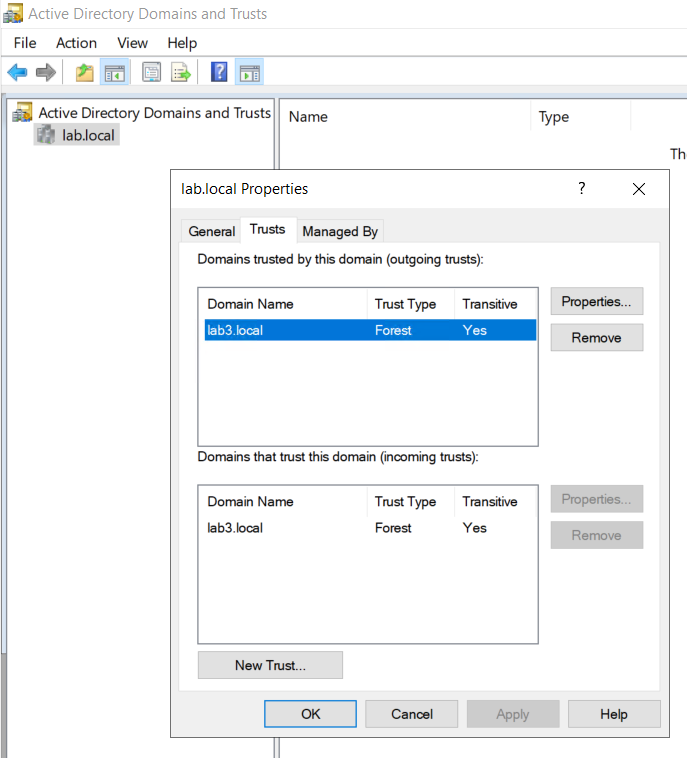
The test users are:
auser101@onpremx.com    → lab.local
auser301@onpremx.com    → lab3.local
The PTA agent used for the test is located in the lab3.local forest. Therefore, auser301 is local to the PTA agent forest, while auser101 requires cross-forest lookup through the trust.
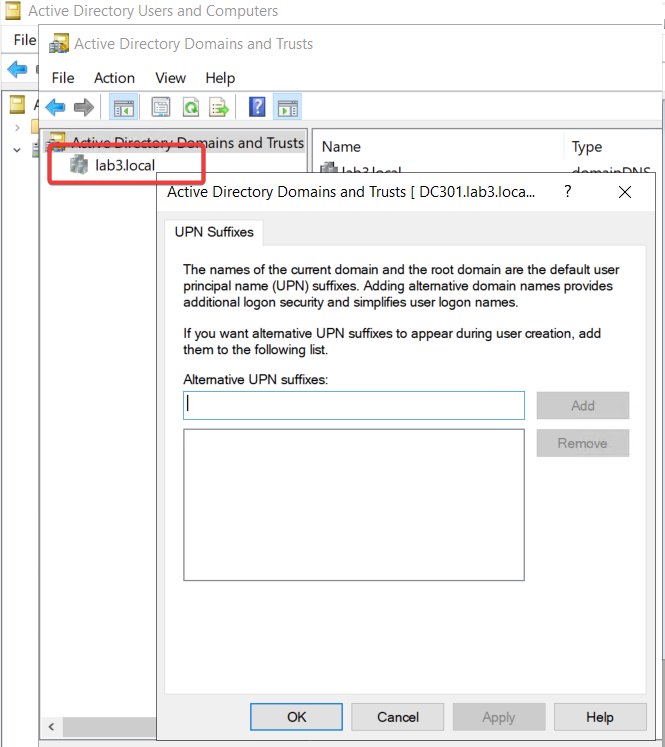
During troubleshooting, the duplicate Alternative UPN Suffix configuration was removed from lab3.local. The screenshot below shows that the Alternative UPN suffix list is empty on lab3.local after the cleanup.
2. Name Suffix Routing
Forest Trust alone is not enough. Active Directory must also know where a UPN suffix should be routed.
Open:
Active Directory Domains and Trusts
Trust Properties
Name Suffix Routing
With a healthy configuration, the onpremx.com suffix is available for routing through the forest trust.
*.onpremx.com Enabled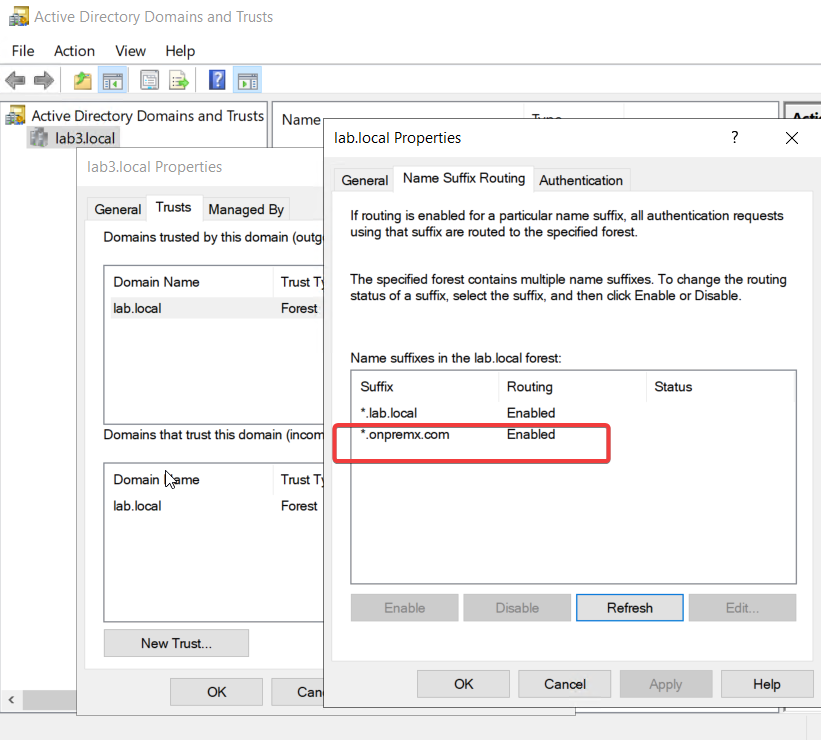
3. Testing PTA Directly from the Agent
The PTA Authentication Agent includes a PowerShell troubleshooting module that can test the on-premises logon path directly from the agent server.
Import-Module "C:\Program Files\Microsoft Azure AD Connect Authentication Agent\Modules\PassthroughAuthPSModule\PassthroughAuthPSModule.psd1"

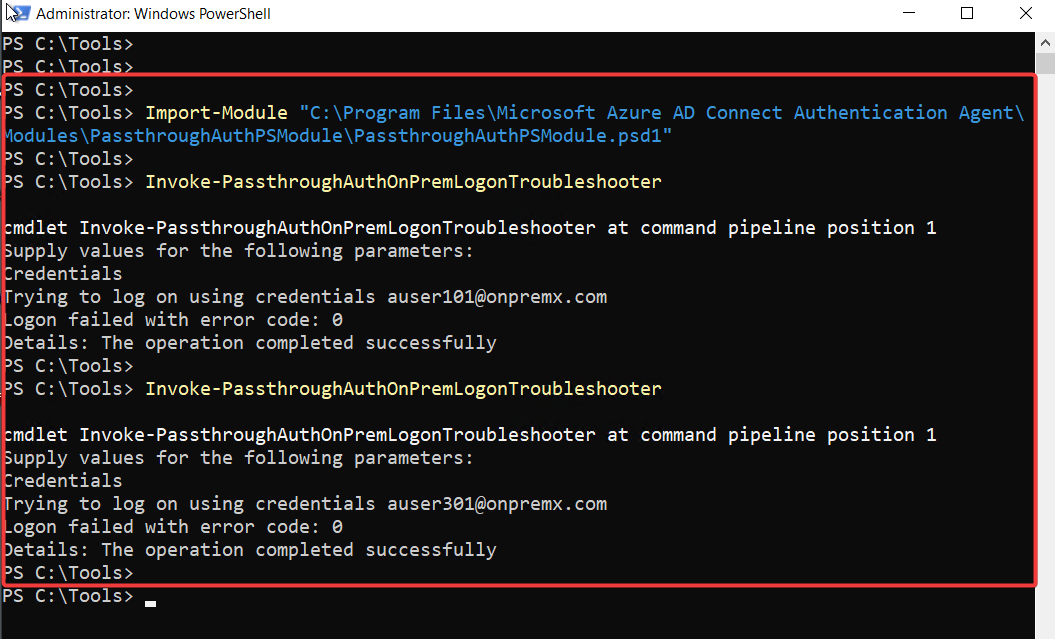
Invoke-PassthroughAuthOnPremLogonTroubleshooterOne detail in the troubleshooter output can be confusing. A successful validation is displayed as:
Logon failed with error code: 0
Details: The operation completed successfully
In this output, error code 0 means success.
4. Baseline Test
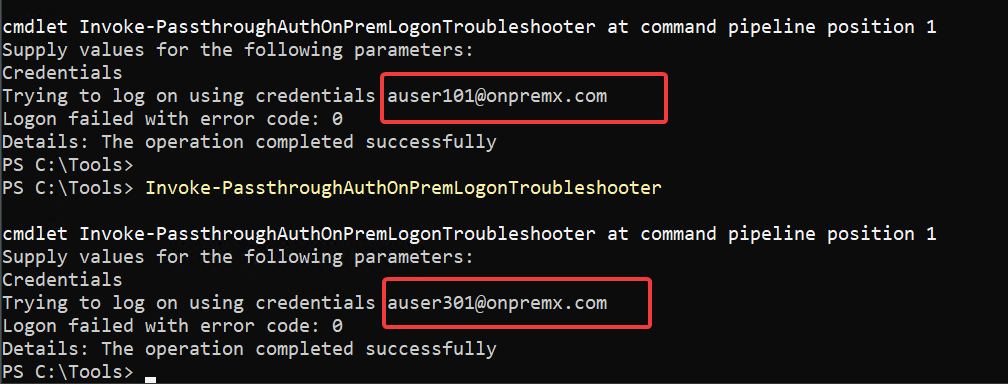
With Name Suffix Routing enabled, I tested both users from the PTA agent in lab3.local.
auser101@onpremx.com    Error code 0    Success
auser301@onpremx.com    Error code 0    Success
This confirmed that the PTA agent could validate the local forest user and also locate the remote forest user through the trust.
5. Reproducing the Problem
To isolate the effect of Name Suffix Routing, I intentionally disabled routing for the onpremx.com suffix.
*.onpremx.com Disabled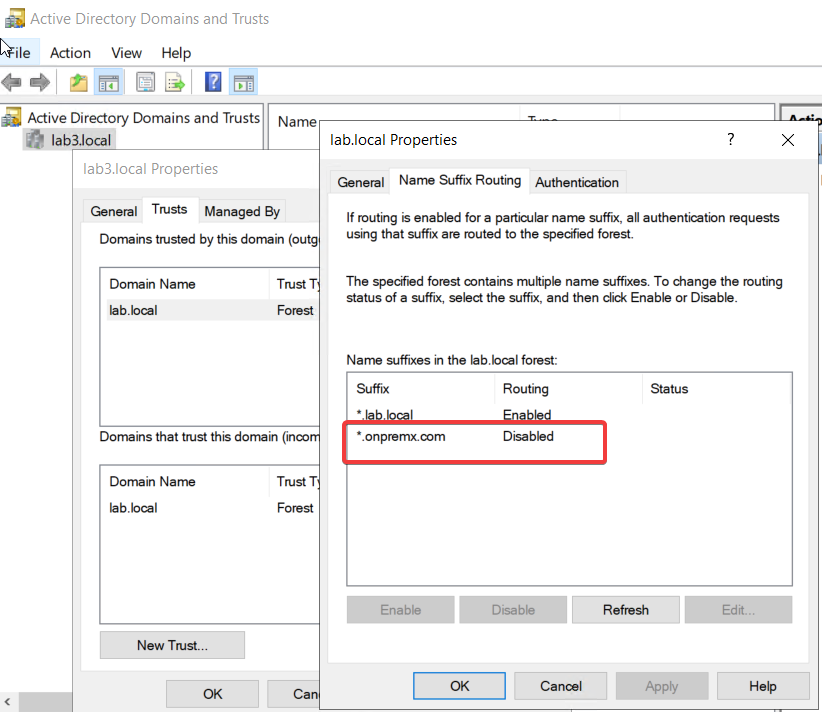
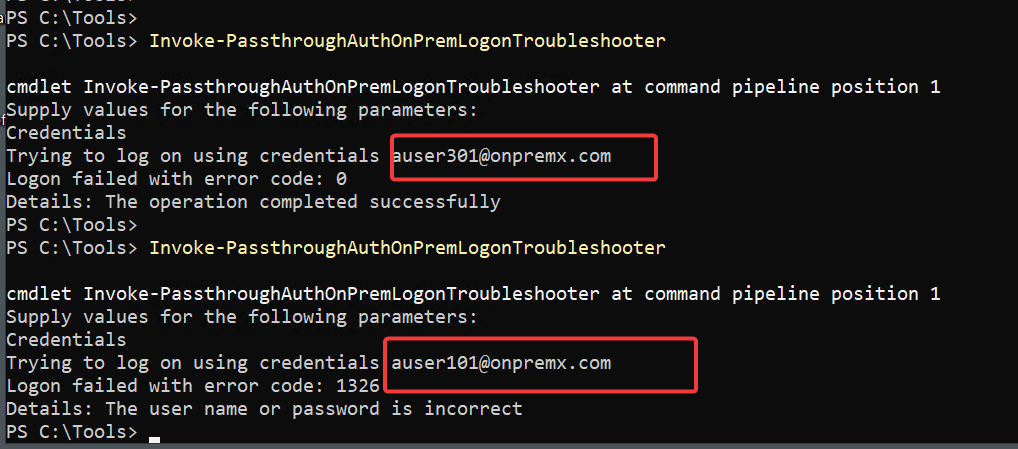
I then repeated the same PTA tests from the same agent.
auser301@onpremx.com    Error code 0       Success
auser101@onpremx.com    Error code 1326    Failed
The local forest user continued to authenticate successfully. The remote forest user failed with error code 1326.
Error 1326 normally means that the user name or password is incorrect. In this test, however, the password was not the problem. The same credentials worked when Name Suffix Routing was enabled. The failure was caused by the cross-forest lookup path.
6. Why Does This Happen?
For a local forest user, the authentication path is relatively simple:
PTA Agent
   ↓
Local Active Directory
   ↓
User
For a user in another forest, Active Directory must locate the user through the trust:
PTA Agent
   ↓
Local Active Directory
   ↓
Forest Trust
   ↓
Name Suffix Routing
   ↓
Remote Forest
   ↓
User
If the UPN suffix cannot be routed to the correct forest, the PTA agent cannot reach the correct user account for password validation.
This can easily look like a PTA agent problem because the cloud side of PTA is healthy and the agent itself is running. The important clue is that users in one forest work while users requiring cross-forest lookup fail.
7. Fixing the Problem
After re-enabling Name Suffix Routing for onpremx.com, the remote forest user could be validated again.
*.onpremx.com    Enabled

auser101@onpremx.com    Error code 0    Success
No PTA agent reinstall was required. No PTA registration change was required. The difference was entirely in the Active Directory cross-forest routing path.
8. What Should You Check?
If the same PTA agent authenticates users from one forest but consistently fails for users located in another forest, check the Active Directory side before reinstalling the PTA agent.
Forest Trust
Trust Direction
DNS Resolution between forests
Alternative UPN Suffix configuration
Name Suffix Routing
Duplicate or conflicting UPN suffixes
Cross-forest user resolution
9. Microsoft Guidance
Microsoft supports Pass-through Authentication in multi-forest Active Directory environments when two-way forest trusts exist between the forests and Name Suffix Routing is configured correctly.
This is documented in the Microsoft Entra Pass-through Authentication FAQ.
That makes the behavior demonstrated in this lab directly relevant to supported multi-forest PTA deployments. If authentication works for users in one forest but fails for users in another, the forest trust and Name Suffix Routing configuration should be verified before treating the issue as a PTA agent failure.
10. Key Takeaways
PTA authentication problems in multi-forest environments are not always caused by the PTA agent itself.
In this lab, both users authenticated successfully while Name Suffix Routing was enabled. After routing for onpremx.com was disabled, the user in the PTA agent’s local forest continued to work, while the remote forest user failed with error 1326.
Re-enabling Name Suffix Routing restored cross-forest authentication.
If PTA works for some users but consistently fails for users in another forest, verify Forest Trust and Name Suffix Routing before replacing or reinstalling the PTA agent.
References
- Microsoft Entra Pass-through Authentication
- Microsoft Entra Pass-through Authentication Quickstart
- Microsoft Entra Pass-through Authentication Security Deep Dive

Cloud and infrastructure professional with nearly two decades of experience in enterprise IT environments, spanning public cloud, private cloud, and hybrid architectures.