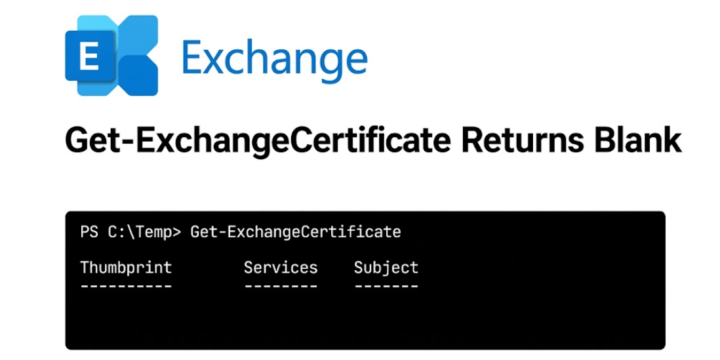
Applies to: Exchange Server 2019 CU15 While validating a fresh Exchange Server 2019 CU15 installation, I started capturing the default configuration before making any namespace, certificate, or authentication changes. One of the first checks was Get-ExchangeCertificate. Unexpectedly, the cmdlet returned only the column headers and no certificate objects, even though the Exchange Admin Center showed the certificates normally. PowerShellGet-ExchangeCertificateGet-ExchangeCertificate Thumbprint Services Subject ---------- -------- ------- At first, this looked like the known Exchange Auth Certificate issue associated with PowerShell Serialization Payload Signing. However, the Auth Certificate was present, valid, correctly configured, and Microsoft's validation script reported no problem. What initially looked like a certificate problem eventually turned out to be related to the timing of certificate activation and HMAC key selection. In This Article 1. Certificates Were Present and the…
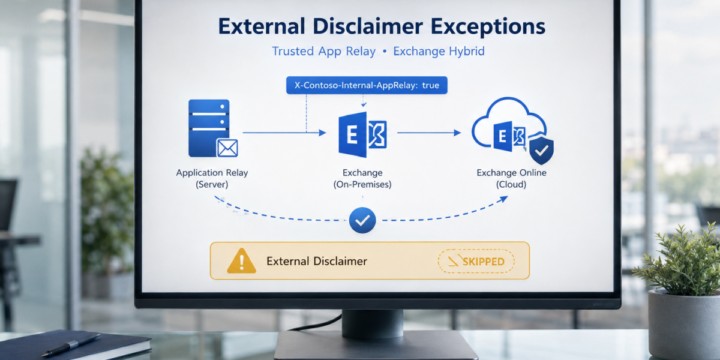
Applies to: Exchange Server SE / 2019 / 2016 | Exchange Online | Hybrid In Exchange Hybrid environments, it is common to use mail flow rules to add an external disclaimer or warning banner to messages received from outside the organization. A typical warning may look like this: WARNING: This email originated from outside the organization. Do not click links or open attachments unless you recognize the sender. This is a good security control. It helps users identify messages that came from external sources. However, there are some scenarios where messages generated by internal application servers may also receive this external disclaimer. This usually happens when an internal application server submits email anonymously to Exchange Server on-premises, and Exchange then routes the message to Exchange Online. In this article, we…
Applies to: Exchange Server SE / 2019 Microsoft recently published guidance for Exchange Server addressing the May 2026 vulnerability. One important note in the article is related to OWA Light. Microsoft states that OWA Light — accessed by using an OWA URL ending with /?layout=light — does not work properly after the mitigation is applied. Microsoft also notes that this feature was deprecated several years ago and is not intended for regular production use. For a deeper look at the OWA request path and frontend/backend authentication design, see Exchange OWA Authentication Deep Dive – Part 1. This can become a practical issue if some users previously selected the following option in Outlook on the web: "Use the light version of Outlook" When this option is selected, the user may continue…
Applies to: Exchange Server SE / 2019 / 2016 / 2013 / 2010 Dial tone recovery is an Exchange Server recovery method that gives users temporary mailboxes so they can continue sending and receiving email while the original mailbox database is being restored. The original version of this article was written for Exchange Server 2010 with Windows Server Backup. Microsoft still documents dial tone recovery for Exchange Server Subscription Edition, Exchange Server 2019, and Exchange Server 2016. The recovery concept is the same, although the current procedure is based on Exchange Management Shell, a dial tone database, a Recovery Database, and mailbox restore requests. In This Article 1. What Is Dial Tone Recovery? 2. Dial Tone Recovery Process 3. Same Server or Alternate Server 4. Recovery Database and Data Merge…
Applies to: Exchange Server SE / 2019 / 2016 / 2013 / 2010 Exchange Server supports Recovery Databases (RDBs) for restoring mailbox data from a recovered database without interrupting access to the active mailbox database. This applies to Exchange Server Subscription Edition, Exchange Server 2019, and Exchange Server 2016. One useful scenario is restoring the contents of an old mailbox into a different existing mailbox. The recovered database is mounted as an RDB, the source mailbox is identified by its mailbox GUID, and New-MailboxRestoreRequest copies the data into the target mailbox. In This Article 1. What Is a Recovery Database? 2. Prepare the Restored Database 3. Create the Recovery Database 4. Mount and Check the Recovery Database 5. Restore the Mailbox to a Different Mailbox 6. Monitor the Restore and…
Applies to: Exchange Server SE / 2019 / 2016 / 2013 / 2010 Exchange Server uses a Recovery Database (RDB) to mount a restored mailbox database and recover mailbox data without disrupting the production database. After the restored database is mounted as an RDB, New-MailboxRestoreRequest can merge mailbox data into an existing mailbox. The original version of this article demonstrated the process on Exchange Server 2010 with Windows Server Backup. The same Recovery Database concept continues in current Exchange Server releases, although the backup and recovery workflow has evolved. In This Article 1. How Recovery Databases Work 2. Restore the Exchange Database 3. Prepare the Restored Database 4. Create and Mount the Recovery Database 5. Restore Mailbox Data 6. Key Takeaways 1. How Recovery Databases Work Exchange 2003 and Exchange…
Applies to: System Center Data Protection Manager 2025 / 2022 / 2019 | Exchange Server 2019 / 2016 / 2013 Data Protection Manager (DPM) can report an Exchange mailbox database replica as inconsistent when a consistency check fails. One common cause is a version mismatch between eseutil.exe and ese.dll on the Exchange server and the DPM server, especially after an Exchange update. Error ID 30146 is a general data consistency verification failure, so it should not automatically be treated as an Eseutil mismatch. Check the accompanying error details and event logs before applying the fix. In This Article 1. Symptom 2. Why the Eseutil Version Matters 3. Compare the File Versions 4. Update the Files on the DPM Server 5. Run the Consistency Check Again 6. Other Causes of Error…
Applies to: Exchange Server SE / 2019 / 2016 After moving a mailbox to another mailbox database, you may still see the old mailbox on the source database with a SoftDeleted disconnect reason. This is expected behavior in Exchange Server, including Exchange Server Subscription Edition, Exchange Server 2019, and Exchange Server 2016. The mailbox on the source database is not another active copy of the user mailbox. Exchange keeps the source mailbox temporarily so that its data can still be used for recovery if something goes wrong after the move. In This Article 1. Why This Happens 2. Check Soft-Deleted Mailboxes 3. Check Mailbox Retention 4. Should You Delete It? 5. Permanently Purge a Soft-Deleted Mailbox 6. Key Takeaways 1. Why This Happens When a mailbox move between Exchange mailbox…
Applies to: Exchange Server SE / 2019 / 2016 / 2013 / 2010 In an Exchange Database Availability Group (DAG), you can prevent a Mailbox server from being selected for automatic database activation. This is useful when a DAG member should keep passive database copies but should not automatically host an active copy after a failure. The original version of this article described this as “manual failover.” A more accurate description is blocking automatic database activation on a DAG member. In This Article 1. Block Automatic Database Activation 2. What Blocked Does and Does Not Do 3. Allow Automatic Activation Again 4. Maintenance Mode Is Different 5. Key Takeaways 1. Block Automatic Database Activation To prevent database copies on a specific DAG member from being automatically activated, set the server-level…