Applies to: Exchange Server SE | Windows Server 2025 / 2022 / 2019 / 2016
Introduction
During a customer engagement, we noticed recurring Event ID 16969 warnings in the System event log of an Exchange Server. The events reported denied Remote SAM requests, yet Exchange Server was functioning normally.
This raised several questions. Was Exchange Server attempting to access a domain controller, or was another computer attempting to access the Exchange server? What was causing these warnings? Was any corrective action necessary?
To better understand this behavior, I reproduced the scenario in a lab environment and investigated how to identify the account, source computer, and potential processes behind the denied requests.
This article shares the findings and explains how to investigate similar events in Exchange Server environments.
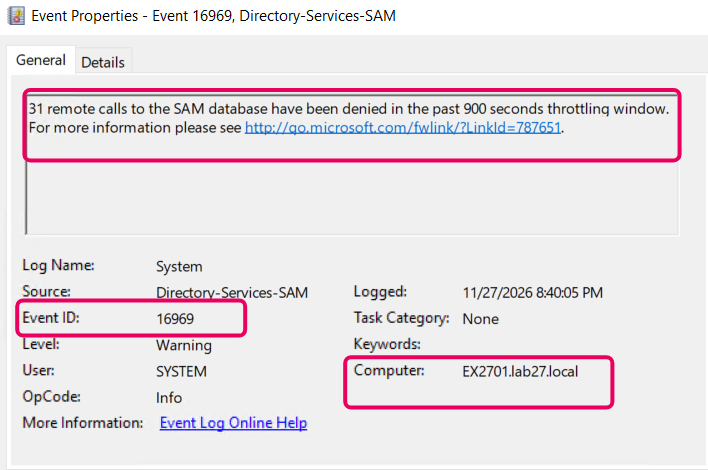
The following warning was repeatedly recorded in the System event log.
1 remote calls to the SAM database have been denied in the past 900 seconds throttling window.

For more information please see http://go.microsoft.com/fwlink/?LinkId=787651.
The following screenshot shows the same warning recorded during controlled testing.
Log: System Source: Microsoft-Windows-Directory-Services-SAM Event ID: 16969
Event ID
Description
16965
Reports a denied Remote SAM request, including the client SID and network address.
16969
Reports the number of denied Remote SAM calls for which Event ID 16965 logging was suppressed during the throttling window.
Event ID 16969 was recorded repeatedly, but no Event ID 16965 records were found in the System event log.
We needed Event ID 16965 to identify the account and computer making these requests. However, Windows uses a default throttling window of 900 seconds (15 minutes) to prevent excessive event logging. This mechanism limits detailed Event ID 16965 logging and uses Event ID 16969 to report the number of Remote SAM calls denied during the throttling window.
This explains why Event ID 16969 can continue to appear even when no Event ID 16965 records are available for the same period.
To collect the information we need, we can temporarily disable event throttlingwithout changing the Remote SAM access permissions.
2. Remote SAM Access on Member Servers and Domain Controllers
The Security Account Manager Remote Protocol (SAMR) is an RPC protocol used to remotely query and manage user accounts, groups, and group memberships.
The account database accessed through SAMR depends on the server role.
Server Role
Account Database
Default Remote SAM Access
Member Server
Local SAM
BUILTIN\Administrators
Domain Controller
Active Directory (NTDS.dit)
Everyone (Read Access)
On a member server, local users and groups are stored in the SAM database. On a domain controller, domain users and groups are stored in Active Directory.
In both cases, SAMR provides access to account information, not direct access to the database files.
Windows uses the same event message on both server roles, which can be misleading. The term “SAM database” in the event message does not necessarily refer to the local SAM database.
The server that records Event ID 16965 or 16969 is the target of the denied request.
If the event is recorded on an Exchange member server, a remote client attempted to access that Exchange server’s local SAM database through SAMR.
If the event is recorded on a domain controller, a remote client attempted to access Active Directory account information on that domain controller through SAMR.
Remote SAM access is controlled by the following security policy:
Network access: Restrict clients allowed to make remote calls to SAM
By default, Windows Server 2016 and later restrict Remote SAM access on member servers to the built-in Administrators group. On domain controllers, the default is more permissive for application compatibility. Active Directory object permissions still apply.
Both Event IDs 16965 and 16969 were observed on a member server and a domain controller during controlled testing with Exchange Server SE RTM and Windows Server 2019.
3. Potential Impact on Exchange Server
Event ID 16969 alone does not indicate a problem with Exchange Server functionality.
Microsoft documents a Remote SAM access issue in KB4055652 that can affect Offline Address Book (OAB) generation. However, this is a different scenario.
Scenario
Request Direction
Server Recording the Event
Our case
Remote Client → Exchange Server
Exchange Server
KB4055652
Exchange Server → Domain Controller
Domain Controller
The solution described in KB4055652 should not be applied simply because the Event ID is the same.
I found no documented connection between Event ID 16969 recorded on an Exchange member server and failures in Outlook connectivity, Mail Flow, DAG, or Managed Availability.
In our case, a Group Policy Object (GPO) was applied to the Exchange servers with the following security setting:
Computer Configuration → Policies → Windows Settings → Security Settings → Local Policies → Security Options
Network access: Restrict clients allowed to make remote calls to SAM
Setting
Configuration
Policy
Defined
Security Group
BUILTIN\Administrators
Permission
Allow – Remote Access
This policy allows only members of the built-in Administrators group on each Exchange server to make Remote SAM calls to that server.
By default, this Group Policy setting is Not Defined. When the policy is not defined, Windows Server 2016 and later use a built-in security descriptor that allows Remote SAM access only to members of the local Administrators group on member servers.
In our case, the same permissions were explicitly configured through Group Policy and applied to the Exchange servers.
Exchange Server was functioning normally, and the security policy was working as intended. Therefore, there was no reason to change the GPO.
The next step was to identify which account, computer, and application were making these requests.
4. Identifying the Source of Remote SAM Requests
Event ID 16969does not provide the client SID or network address. To identify which account and computer made the denied requests, we need Event ID 16965.
4.1 Checking Existing Events
First, run the following PowerShell command on the Exchange server where Event ID 16969 was recorded.
Get-WinEvent : No events were found that match the specified selection criteria.
If Event ID 16965 records are already available, there is no need to change the event throttling configuration.
If no Event ID 16965 records are available, we can temporarily disable event throttling to collect detailed information about new denied Remote SAM requests.
4.2 Temporarily Disabling Event Throttling (To Collect Event ID 16965)
Since Event ID 16969 does not contain the client SID or network address, we need to temporarily disable event throttling to collect detailed Event ID 16965 records.
Windows provides the following registry setting to control Remote SAM event throttling.
Setting
Value
Registry Path
HKLM\SYSTEM\CurrentControlSet\Control\Lsa
Value Name
RestrictRemoteSamEventThrottlingWindow
Value Type
REG_DWORD
Default Value
900 (15 minutes)
Diagnostic Value
0 (Disabled)
First, open PowerShell as Administrator on the server where Event ID 16969 was recorded and check the current registry value.
Record the existing value before making any changes. If the registry value does not exist, Windows uses the default throttling interval of 900 seconds.
To temporarily disable event throttling, run the following command:
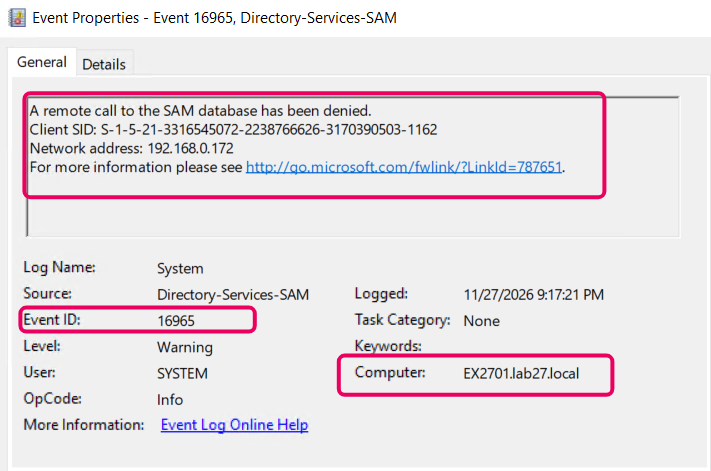
After disabling event throttling, Event ID 16965 provides two important pieces of information: Client SID and Network Address.
The following is an example collected on EX2701 during testing:
TimeCreated : 11/27/2026 9:17:21 PM
Id          : 16965
Message     : A remote call to the SAM database has been denied.
              Client SID: S-1-5-21-3316545072-2238766626-3170390503-1162
              Network address: 192.168.0.172
The Client SID represents the security account used to make the Remote SAM request, not necessarily the computer account of the source computer.
If the Active Directory PowerShell module is available and the SID belongs to an AD user account, we can use the following command:
The network address 192.168.0.172 belongs to EX2702.
We now know the following:
Information
Result
Target Server
EX2701
Source Computer
EX2702
Source IP Address
192.168.0.172
Account
LAB27\LabUser02
Remote SAM Access
Denied
The Client SID may represent a user account, service account, computer account, or group Managed Service Account (gMSA).
At this point, we know which account was used and which computer the request came from. However, Event ID 16965 does not tell us which application or process made the request.
4.4 Identifying Candidate Source Processes
Once the account and source computer are identified, the next step is to find which application or process made the Remote SAM requests.
During testing, I generated Event ID 16965 using two different methods:
Method
Observed Behavior
PowerShell (ADSI WinNT Provider)
Access Denied error while querying the remote Administrators group.
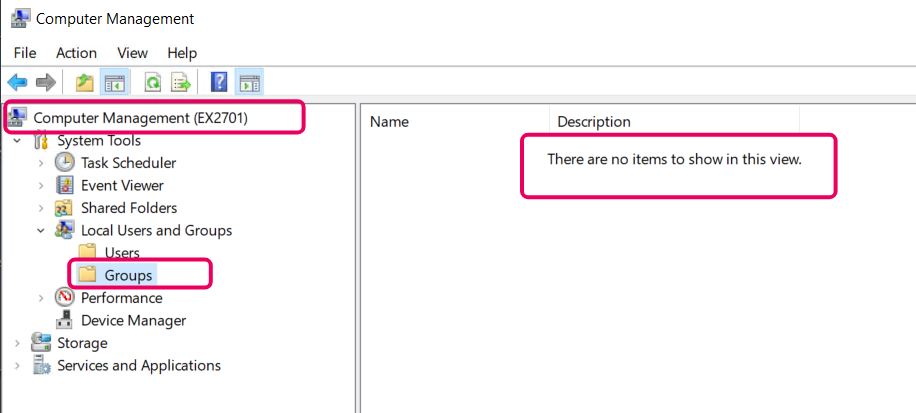
Computer Management (MMC)
The remote Local Users and Groups section opened, but the Groups list was empty. No Access Denied message was displayed.
Both methods generated Event ID 16965 on the target Exchange server.
On the source computer, run the following command to list processes that have loaded SAMLIB.dll:
As we can see, several processes have loaded SAMLIB.dll. This command only lists currently running processes that have loaded SAMLIB.dll. However, this does not mean that all these processes made Remote SAM requests.
The Client SID from Event ID 16965 can help us narrow down the possible processes.
Account Type
What to Check
User Account
PowerShell, MMC and other user applications
Service Account
Services and scheduled tasks
Computer Account
Services running as LocalSystem or NetworkService
gMSA
Services and scheduled tasks using that account
For example, both clussvc.exe and msexchangerepl.exe appear in the output. Let’s check which accounts these services use.
The MMC process started at 21:16:40, and the first Remote SAM denial during the MMC test was recorded at 21:17:15. The account, source IP address and timestamps support MMC as the likely source.
Keep in mind that services can also impersonate users or use different credentials. Checking the Client SID, loaded DLLs, service accounts and timestamps helps narrow down the possible processes, but does not provide definitive process identification.
4.5 Restoring the Original Configuration
Once the required Event ID 16965 records have been collected, restore the original event throttling configuration.
If the RestrictRemoteSamEventThrottlingWindow registry value did not exist before troubleshooting, remove it:
Important: Do not modify the RestrictRemoteSAM or RestrictRemoteSamAuditOnlyMode registry values during this procedure. We are only changing event throttling, not Remote SAM access permissions or enforcement behavior.
5. Security Implications and Recommended Actions
Event IDs 16965 and 16969 indicate that Remote SAM requests were denied by Windows. These events do not necessarily indicate an attack or an Exchange Server problem.
Legitimate applications, administrative tools, monitoring solutions, security products, and inventory tools may attempt to query remote user accounts and group memberships.
Before making any changes to Remote SAM access permissions:
Identify the account and source computer using Event ID 16965.
Identify the application or service making the requests.
Determine whether the application has a legitimate requirement for Remote SAM access.
Check whether the denied requests cause any functional problems.
Review the application vendor’s documentation before granting additional permissions.
Do not grant Remote SAM access or add accounts to the local Administrators group simply to eliminate these warnings.
If an application has a legitimate and documented requirement for Remote SAM access, consider granting the required account only the necessary permissions through the Remote SAM security policy.
In our case, Exchange Server was functioning normally, and the configured security policy was working as intended. Therefore, no changes to Remote SAM access permissions were necessary.
The objective is to understand why these requests are being made, not simply to eliminate the warnings from the System event log.
6. Key Takeaways
Event IDs 16965 and 16969 are recorded on the server receiving the Remote SAM requests, not on the computer initiating them.
On member servers, Remote SAM requests target the local SAM database. On domain controllers, they target Active Directory account information through SAMR.
Event ID 16965 provides the Client SID and network address. Temporarily disabling event throttling helps collect this information without changing Remote SAM access permissions.
The Client SID, source IP address, loaded DLLs, service accounts, and timestamps can help identify candidate source processes.
Do not change Remote SAM access permissions simply to eliminate event log warnings. First identify the source, understand its purpose, and determine whether there is any functional impact.
I’m a Cloud Solution Architect – Global Delivery at Microsoft, working within the Modern Work team. My areas of expertise include Exchange Server (on-premises), Exchange Hybrid, Exchange Online, Microsoft 365, security, identity, and enterprise infrastructure.