Applies To: Windows Server 2025 / 2022 / 2019 / 2016
Windows Server DHCP Failover in Hot Standby mode uses an active server and a standby server to maintain availability. When the active server becomes unavailable, how many IP addresses can the standby assign to new clients, and when do those addresses become available?
The questions behind this article came from a customer engagement. In environments serving hundreds of thousands or even millions of DHCP clients across many scopes, exact standby capacity and failover timing matter when planning for outages and deciding whether existing settings need adjustment. For example, during an active-server outage, new clients can fail to get an address even though the scope still shows thousands of free addresses.
In Windows Server 2022 lab, I used two DHCP servers and examined address pools containing 1,003, 5,015, and 25,075 addresses across successive configurations. I compared ReservePercent with actual address ownership and examined how CommunicationInterrupted, PartnerDown, and Maximum Client Lead Time (MCLT) affect address allocation and recovery.
I also simulated thousands of DHCP clients using ISC Kea perfdhcp to observe address allocation under load, lease replication between the servers, and DHCP database statistics. The experiments also covered initial lease durations, subsequent renewals, lease expiration, and database cleanup.
This article explains the observed behavior and what administrators should know when monitoring and troubleshooting DHCP Failover in Hot Standby mode.
I used two Windows Server 2022 DHCP servers joined to the same Active Directory domain and configured in a Hot Standby failover relationship.
Component
Configuration
Active DHCP server
DHCP2501
Standby DHCP server
DHCP2502
Failover mode
Hot Standby
Maximum Client Lead Time (MCLT)
5 minutes
Scope lease duration
8 hours
I set MCLT to five minutes to keep the experiments short. The Windows Server default is one hour, so initial lease durations and the wait in PartnerDown before the server can use the partner’s free addresses can be longer with the default setting.
To examine address allocation with different pool sizes, I used the following DHCP address ranges:
Scope
Configured DHCP address range
Pool size
10.250.0.0/22
10.250.0.20–10.250.3.254
1,003
10.10.0.0/19
10.10.0.20–10.10.19.170
5,015
10.10.0.0/17
10.10.0.20–10.10.98.6
25,075
Pool sizes refer to the configured DHCP address ranges, not the full subnet capacity. The pool containing 5,015 addresses was later replaced with the pool containing 25,075 addresses.
I used ISC Kea perfdhcp 3.0.4 on a single Kali Linux VM to simulate DHCP clients with different MAC addresses and Client IDs.
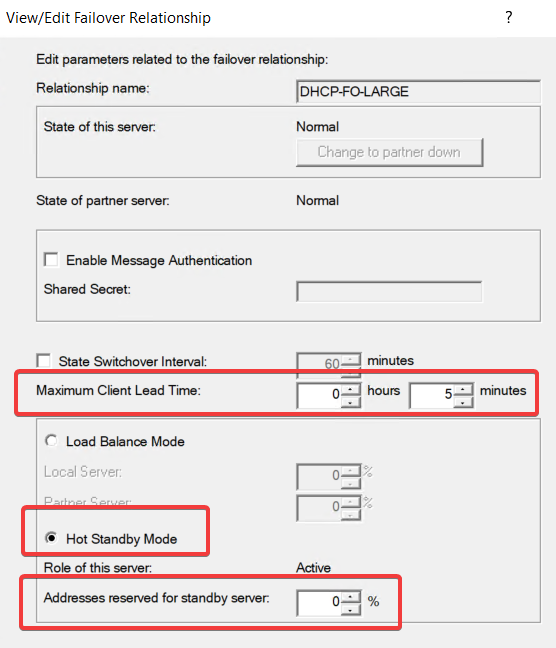
The following screenshot shows the DHCP-FO-LARGE relationship configured with ReservePercent = 0% and a five-minute MCLT.
2. ReservePercent and Actual Standby Address Ownership
In Hot Standby mode, ReservePercent specifies the percentage of addresses reserved for the standby server. However, in these lab measurements, the configured percentage did not always correspond to the number of free addresses currently owned by the standby server.
To check actual address ownership on DHCP2502, I used:
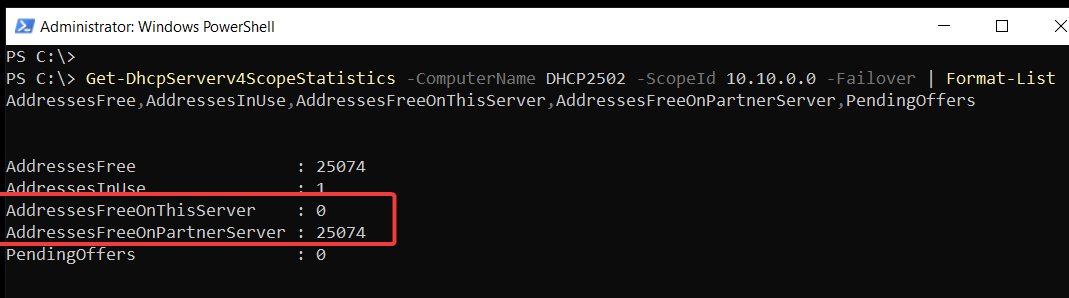
The two counters used throughout this section are:
AddressesFreeOnThisServer: Free addresses owned by the queried DHCP server.
AddressesFreeOnPartnerServer: Free addresses owned by its failover partner.
The following screenshot shows these counters on DHCP2502. It was captured on October 25, 2026, while the failover relationship was in Normal state.
2.1 ReservePercent Across Different Address Pool Sizes
On the two larger address pools, I increased ReservePercent from 0% to 10% and then reduced it back to 0%. The original pool containing 1,003 addresses was measured during the descending sequence only.
The tables below show the AddressesFreeOnThisServer values reported by DHCP2502 at each measured setting.
Table 1. Ascending ReservePercent: 0% to 10%
ReservePercent
5,015 addresses
25,075 addresses
0%
0
0
1%
0
0
2%
0
0
3%
0
0
4%
200
1,000
5%
200
1,000
10%
501
2,000
Table 2. Descending ReservePercent: 10% to 0%
ReservePercent
1,003 addresses
5,015 addresses
25,075 addresses
10%
100
501
2,000
5%
50
250
2,000
4%
50
250
1,003
3%
50
250
1,003
2%
20
250
1,003
1%
20
50
250
0%
20
50
250
The same configured percentage produced different ownership counts during the ascending and descending sequences.
For example, on the pool containing 25,075 addresses, DHCP2502 owned 1,000 free addresses at a 5% reserve during the ascending sequence, compared with 2,000 at the same setting during the descending sequence.
All measurements on the two larger pools reported PendingOffers = 0.
These results show that, at the recorded measurement points, changes to ReservePercent did not consistently produce a proportional change in the number of free addresses owned by the standby server.
2.2 What Happens When ReservePercent Is Set to 0%?
A newly created Hot Standby relationship configured with ReservePercent = 0% initially showed no free addresses owned by the standby server.
Reducing the percentage to 0% after using higher values produced different results:
Address pool
Initial 0%
0% after descending changes
5,015 addresses
0
50
25,075 addresses
0
250
The original pool containing 1,003 addresses also retained 20 locally owned free addresses after ReservePercent was reduced to 0%. Its initial baseline was measured at 1%, so it is excluded from the initial 0% comparison.
This distinction also affected allocation to new clients. On the original scope, DHCP2502 continued assigning addresses from its locally owned pool with ReservePercent = 0%.
After that pool was exhausted during CommunicationInterrupted, five new DHCPDISCOVER requests received no DHCPOFFER responses, even though the partner still owned 960 free addresses.
The October 25 screenshot is a later Normal-state snapshot, not the initial 0% measurement shown in the table.
The practical takeaway is that, when assessing allocation to new clients during CommunicationInterrupted, check AddressesFreeOnThisServer rather than relying on ReservePercent or the scope’s total free address count alone.
3. Active Server Failure and Address Pool Takeover
In Hot Standby mode, the active server handles new DHCP requests. When the standby server loses contact with its partner, it enters CommunicationInterrupted and can lease only addresses it owns. Whether it can use the partner’s free addresses depends on two things: the failover state and Maximum Client Lead Time (MCLT).
3.1 CommunicationInterrupted vs. PartnerDown
I stopped the DHCP Server service on DHCP2501 and checked the failover state on DHCP2502.
DHCP2502 moved to CommunicationInterrupted. The scope statistics on the pool containing 25,075 addresses showed:
Counter
Value
AddressesFree
4,530
AddressesFreeOnThisServer
0
AddressesFreeOnPartnerServer
4,530
The scope had 4,530 free addresses, but DHCP2502 owned none of them.
Next, I manually set the relationship to PartnerDown. The failover state changed, but DHCP2502’s configured role stayed Standby.
3.2 Allocation Before and After MCLT
DHCP2501 stayed stopped throughout the experiment. DHCP2502 entered PartnerDown with MCLT set to five minutes. I sent DHCP requests before and after the MCLT interval:
Stage
DHCPDISCOVER
DHCPACK
Before MCLT
10
0
After MCLT
5
4
Before MCLT, DHCP2502 did not offer addresses to new clients. Once MCLT had passed, new clients started receiving leases from the partner’s free pool. I observed the same behavior with pools containing 1,003 and 25,075 addresses.
In CommunicationInterrupted (Section 2.2), AddressesFreeOnThisServer = 0 meant DHCP2502 could not lease any addresses to new clients. In PartnerDown, once MCLT had passed, that zero value did not prevent address allocation.
3.3 Automatic Transition to PartnerDown
On the original scope, I enabled AutoStateTransition and set StateSwitchInterval to three minutes. DHCP2502 then moved to PartnerDown without manual intervention.
These two settings serve different purposes:
StateSwitchInterval determines when the server automatically moves to PartnerDown after communication is lost.
MCLT affects when the server in PartnerDown can start using the partner’s free addresses.
When planning how long new clients may have to wait for access to the partner’s addresses, consider both settings. Without automatic state transition, the standby server remains limited to the addresses it owns until an administrator sets PartnerDown manually or communication is restored.
4. MCLT and Failover Recovery
When the active DHCP server comes back online, the failover relationship does not return to Normal right away. The servers must first complete the recovery process.
4.1 Natural Recovery
I started the DHCP Server service on DHCP2501 and let recovery complete without any further service restarts. MCLT was set to five minutes.
Event ID 20251 recorded the following transitions:
Stage
State Transition
Service startup
Startup → Recover → RecoverWait
Five minutes later
RecoverWait → RecoverDone → Normal
The relationship stayed in RecoverWait for exactly five minutes, which matched the configured MCLT, before both servers returned to Normal.
4.2 Recovery After Additional Service Restarts
In separate experiments, I restarted the DHCP Server service during RecoverWait. In those runs, recovery followed a different path through PotentialConflict and ConflictDone, and some runs reached Normal in less than five minutes.
These experiments do not show that restarting the service is a reliable way to shorten MCLT or speed up recovery.
5. Initial Lease Duration and Renewal Behavior
The scope lease duration was set to eight hours. However, packet captures showed that new clients first received a 300-second (five-minute) lease, which matched the configured MCLT.
I observed this on both DHCP servers:
DHCP2501 in Normal state
DHCP2502 in PartnerDown state
5.1 Initial DHCP Lease
The packet captures showed the following values:
DHCP Option
Observed Value
Option 51 — Lease Time
300 seconds
Option 58 — Renewal Time (T1)
150 seconds
Option 59 — Rebinding Time (T2)
259 seconds
The initial lease matched MCLT even when the relationship was in Normal state. This behavior is not limited to failover or outage conditions.
5.2 Lease Duration After Renewal
To observe what happens after the initial allocation, I used a real Kali Linux DHCP client.
The client first received a 300-second lease. Later, client lease information and the Windows DHCP database showed an eight-hour lease. The client reported:
These values correspond to an eight-hour lease, with renewal (T1) at four hours and rebinding (T2) at seven hours.
The first lease a client receives can be as short as MCLT, even when the scope lease duration is much longer. In this experiment, the lease duration increased to the configured eight hours after renewal.
6. DHCP Address Allocation Under Load and Lease Replication
To see how DHCP behaves under load, I used ISC Kea perfdhcp to generate thousands of synthetic DHCP client requests from a single Kali Linux VM. These experiments used the pool containing 25,075 addresses and covered both normal operation and failover conditions.
6.1 Address Allocation Under Load
I generated DHCP requests at different rates and recorded how many DHCP transactions completed. Representative results:
Scenario
DHCPDISCOVER
DHCPACK received by perfdhcp
DHCP2501 in Normal state
10,000
9,994
DHCP2502 in PartnerDown state
3,000
1,867
During normal operation, perfdhcp received 9,994 DHCPACK responses out of 10,000 requests. During PartnerDown, it received 1,867 DHCPACK responses while DHCP2502 was allocating addresses from the partner’s free pool.
These experiments ran under different conditions, so the results are not a performance comparison. They show that address allocation works under load. They do not show the maximum throughput of either server.
6.2 AddressesInUse Is Not the Number of Leased Clients
The AddressesInUse counter does not always equal the number of clients that completed a DHCP transaction. At one checkpoint, DHCP2501 reported:
Measurement
Value
Active leases
8,555
PendingOffers
1,000
AddressesInUse
9,555
At this checkpoint, 8,555 active leases and 1,000 PendingOffers accounted for the 9,555 AddressesInUse reported by DHCP2501.
To check how many leases are recorded as active, use the active lease records. DHCPACK counts and database records are different measurements.
6.3 Lease Replication Between DHCP Servers
To verify replication between the failover partners, I compared the lease records on DHCP2501 and DHCP2502:
Both servers held matching IP address and Client ID records for thousands of synthetic clients. The comparison checked those two fields, not every lease property.
7. Lease Expiration and Database Cleanup
When a DHCP lease expires, the DHCP server does not necessarily delete its record from the database right away. Windows DHCP retains expired lease records for a four-hour grace period before regular cleanup can delete them.
To observe this, I tracked four addresses that DHCP2502 assigned during PartnerDown on the original scope containing 1,003 addresses. For this experiment, I changed the database cleanup interval on DHCP2501 from 60 minutes to five minutes.
7.1 Lease Expiration and Retention
All four leases expired on October 23, 2026, between 20:12:54 and 20:12:58. The DHCP audit log on DHCP2501 recorded Audit ID 18 (Expired) for these addresses. However, the expired records stayed in the database and were still counted in AddressesInUse.
Event
Date and time
Result
Lease expiration
Oct 23, 20:12:54–20:12:58
Four leases expired
Database cleanup
Oct 24, 00:12:09
0 leases deleted
Next database cleanup
Oct 24, 00:17:09
4 leases deleted
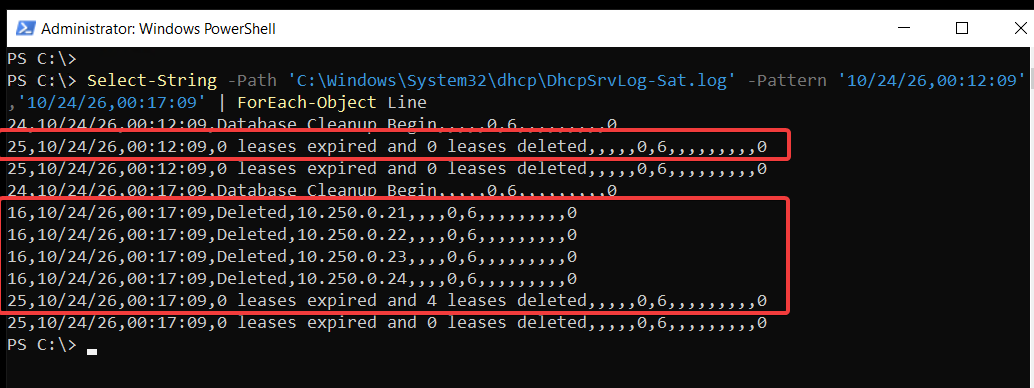
The first cleanup ran less than a minute before the four-hour retention period ended, so it deleted no leases. At the next cleanup, the audit log recorded Audit ID 16 (Deleted) for all four addresses, and Audit ID 25 confirmed that four leases were deleted.
7.2 Verifying Deletion in the DHCP Audit Log
The following screenshot shows the original audit records. It includes the cleanup that deleted no leases and the next cleanup that deleted all four.
The records were deleted about four hours and four minutes after they expired. The deletion happened at the first scheduled cleanup after the four-hour retention period.
An expired lease is not the same as a deleted lease record. With the usual 60-minute cleanup interval, a record may remain for nearly five hours after expiration when only scheduled cleanup is involved. When troubleshooting DHCP address utilization, check whether expired leases are still in the database and counted in AddressesInUse.
8. Key Takeaways
The experiments highlighted several important aspects of Windows Server DHCP Failover in Hot Standby mode:
ReservePercent does not always reflect actual address ownership. Check AddressesFreeOnThisServer and AddressesFreeOnPartnerServer to see how free addresses are distributed between the DHCP servers.
Failover state matters. In CommunicationInterrupted, the standby server can assign new leases only from addresses it owns. In PartnerDown, once MCLT has passed, it can also use the partner’s free addresses.
MCLT and StateSwitchInterval serve different purposes.StateSwitchInterval controls the automatic transition to PartnerDown. MCLT affects lease timing and recovery. These experiments do not show that restarting the service is a reliable way to shorten MCLT or speed up recovery.
Initial DHCP leases can be shorter than the scope lease duration. In these experiments, clients first received five-minute leases that matched MCLT. After renewal, they received eight-hour leases.
AddressesInUse is not the number of leased clients. It can include pending offers and expired lease records that have not yet been deleted. To check active leases, use the lease records.
Lease records matched on both failover partners. Both servers held matching IP address and Client ID records for thousands of synthetic clients.
Lease expiration and database deletion are separate events. Expired records stayed in the database and were still counted in AddressesInUse. They were deleted at the first scheduled cleanup after the four-hour retention period.
Cloud and infrastructure professional with nearly two decades of experience in enterprise IT environments, spanning public cloud, private cloud, and hybrid architectures.