ESE Event IDs 643 and 613, together with ExchangeStoreDB Event ID 124, were recorded when copies of the same Exchange mailbox database ran on DAG members using different Windows Server sorting versions. The issue is not limited to an in-place upgrade.
The investigation began with a production Exchange Server 2019 DAG. New Exchange Server Subscription Edition (SE) servers running Windows Server 2022 had been added to that DAG, and copies of the existing mailbox databases had been created on the new servers. ESE Event ID 613 and ExchangeStoreDB Event ID 124 were reported.
I reproduced the error pattern in a separate Exchange environment, including the NLS sort version mismatch reported by ESE Event ID 643. I examined two scenarios: adding new Exchange SE servers and database copies to an existing DAG, and upgrading Windows Server on an existing Exchange server. I also tested different Exchange and Windows Server upgrade orders to compare the results.
What makes these errors confusing is that the databases still appear healthy. The active database copy can remain Mounted, and the passive copies can show as Healthy in the database availability group (DAG), while the Application event log continues reporting errors.
Some of these events point to problems with database indexes and Windows sorting versions. The error messages also suggest recovery steps that seem reasonable at first. However, completing an operation successfully does not mean the underlying problem has been resolved.
This article covers the event messages, the troubleshooting steps and their results, and the solution.
The investigation covered two ways the same NLS sort version mismatch appeared:
Adding new Exchange SE servers to an existing DAG. New servers running Windows Server 2022 and Exchange Server SE were added to a DAG that originally ran Exchange Server 2019. Copies of existing databases were then added to the new servers. The original and new DAG members used different Windows sorting versions.
Upgrading Windows Server on an existing Exchange server. An in-place OS upgrade changed the server’s Windows sorting version while the mailbox databases and their indexes were already in use.
To compare the behavior, I also performed the Exchange-first and Windows-first upgrade sequences. The captured environment had four DAG members running Exchange Server SE build 15.02.2562.045, but the operating systems differed:
Server
Windows Server
Exchange configuration
EX2701
2019
Upgraded in place from Exchange Server 2019 to SE
EX2702
2022
Windows Server 2019 upgraded to 2022 with Exchange 2019 installed, followed by an upgrade to Exchange SE
EX2703
2022
New Exchange SE installation
EX2704
2022
New Exchange SE installation
DB01 and DB02 were originally created on Exchange Server 2019. DB03 and DB04 were created on Exchange Server SE. Copies of these databases were added across the DAG members. The server table shows the configuration at the time the events were captured, not a single upgrade sequence followed by every server.
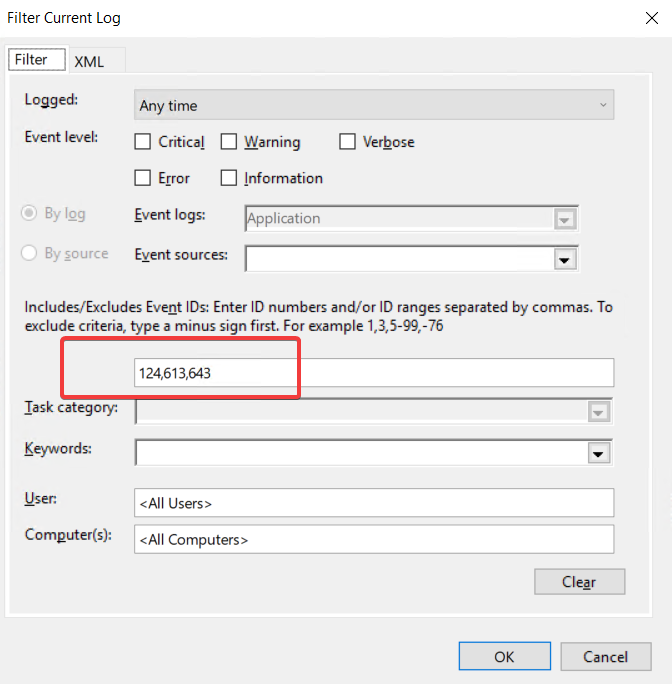
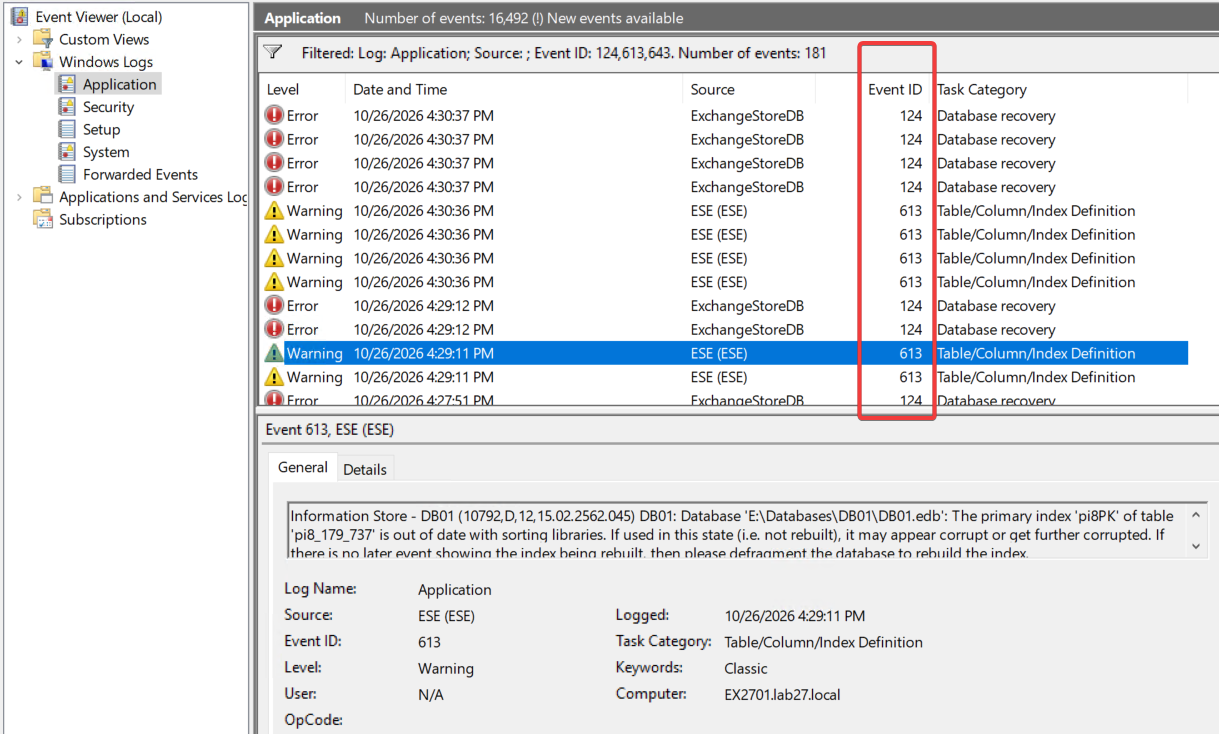
In Event Viewer, open the Application log and filter for Event IDs 124, 613, and 643.
The events included ESE warnings and ExchangeStoreDB errors while the databases were still mounted or their passive copies appeared healthy.
Supportability context: Microsoft does not support upgrading Windows Server in place between major versions with Exchange installed. All members of an Exchange DAG must also run the same supported Windows Server version. The focus here is what the event messages reported and what happened during troubleshooting.
2. Understanding Event IDs 124, 613, and 643
2.1 ExchangeStoreDB Event ID 124: Database Copy Error
Field
Value
Source
ExchangeStoreDB
Log
Application
Event ID
124
Task Category
Database recovery
Level
Error
Server
EX2701.lab27.local
Database
DB01
The complete event description was:
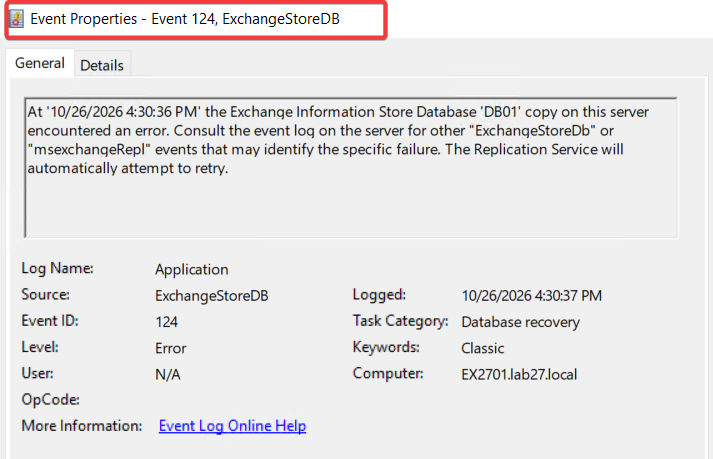
At '10/26/2026 4:30:36 PM' the Exchange Information Store Database 'DB01' copy on this server encountered an error. Consult the event log on the server for other "ExchangeStoreDb" or "msexchangeRepl" events that may identify the specific failure. The Replication Service will automatically attempt to retry.
Event 124 reports a database copy error, but it does not identify the underlying cause. The event message directs the administrator to check related ExchangeStoreDB and MSExchangeRepl records.
In this case, ESE Event 613 was recorded for DB01 at almost the same time. The events need to be checked together, rather than treating Event 124 alone as proof of an NLS problem.
2.2 ESE Event ID 613: Outdated Primary Index
Field
Value
Source
ESE
Log
Application
Event ID
613
Task Category
Table/Column/Index Definition
Level
Warning
Server
EX2701.lab27.local
Database
DB01 (active on EX2701 at the time)
The complete event description was:
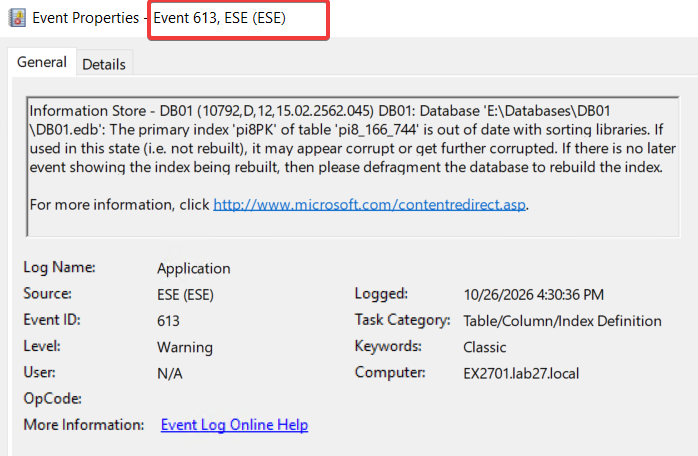
Information Store - DB01 (10792,D,12,15.02.2562.045) DB01: Database 'E:\Databases\DB01\DB01.edb': The primary index 'pi8PK' of table 'pi8_166_744' is out of date with sorting libraries. If used in this state (i.e. not rebuilt), it may appear corrupt or get further corrupted. If there is no later event showing the index being rebuilt, then please defragment the database to rebuild the index.

For more information, click http://www.microsoft.com/contentredirect.asp.
This event is more specific than Event 124. It identifies the EDB file, the table (pi8_166_744), and the primary index (pi8PK) that is out of date with the current sorting libraries.
The event warns that the index can appear corrupt or become corrupted if it is used without being rebuilt. It does not mean the EDB file is already physically corrupted.
This is an internal ESE table index. It is not the BigFunnel search index stored in each mailbox in Exchange Server 2019 and SE.
The event recommends defragmenting the database to rebuild the index. Section 5 covers the defragmentation attempt and its results.
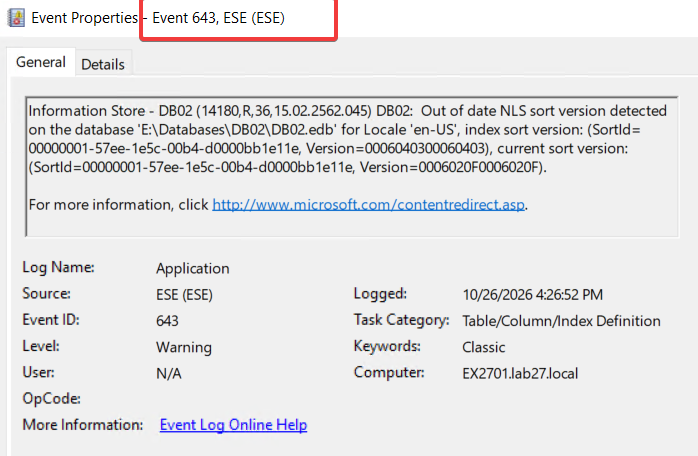
2.3 ESE Event ID 643: NLS Sort Version Mismatch
Field
Value
Source
ESE
Log
Application
Event ID
643
Task Category
Table/Column/Index Definition
Level
Warning
Server
EX2701.lab27.local
Database
DB02 (passive on EX2701 at the time)
The complete event description was:
Information Store - DB02 (14180,R,36,15.02.2562.045) DB02:  Out of date NLS sort version detected on the database 'E:\Databases\DB02\DB02.edb' for Locale 'en-US', index sort version: (SortId=00000001-57ee-1e5c-00b4-d0000bb1e11e, Version=0006040300060403), current sort version: (SortId=00000001-57ee-1e5c-00b4-d0000bb1e11e, Version=0006020F0006020F).

For more information, click http://www.microsoft.com/contentredirect.asp.
Event 643 reports a mismatch between the NLS sort version stored in the database index and the sorting version used by Windows on the Exchange server.
Item
Version
Index sort version
0006040300060403
Current sort version
0006020F0006020F
The locale (en-US) and SortId are the same. The sorting versions are different.
The index contains a newer NLS sort version than the one currently available on EX2701. Section 3 explains this behavior in more detail.
This warning was recorded for DB02, a passive database copy on EX2701. Event 643 was also observed on active database copies in this environment.
Event 643 identifies an NLS sort version mismatch, while Event 613 identifies an outdated ESE primary index. These examples come from different databases, so they should not be treated as a single event sequence.
3. Why the NLS Sort Versions Matter
Exchange mailbox databases use the Extensible Storage Engine (ESE). Its internal indexes depend on Windows sorting rules, which can change between operating system versions.
When a database copy runs on a server with a different National Language Support (NLS) sort version, the stored index version does not match the server’s sorting libraries.
In this environment, the following versions were recorded:
Windows Server
Current NLS sort version
2019 (EX2701)
0006020F0006020F
2022 (EX2702)
0006040300060403
The mismatch appeared in both directions:
On Windows Server 2019, the index reported 0006040300060403, while Windows reported 0006020F0006020F.
On Windows Server 2022, the index reported 0006020F0006020F, while Windows reported 0006040300060403.
The Exchange Server SE build was the same on both servers (15.02.2562.045). The difference was in the Windows sorting versions.
Microsoft’s Windows sorting documentation specifically mentions Exchange as an application that maintains sorted database indexes. It also explains that a major NLS version change can affect existing sorting rules and requires re-indexing. In this case, the major versions were different (0602 and 0604), so the mismatch matters even when the database appears healthy.
For DB01, ESE Event 613 and ExchangeStoreDB Event 124 were also recorded close together. However, Event 124 alone does not establish an NLS problem.
4. Why Reseeding Did Not Fix the NLS Mismatch
DB01’s passive database copies were reseeded during the investigation. On EX2701, the existing database copy was suspended and reseeded using -DeleteExistingFiles.
The -DeleteExistingFiles parameter removes the existing database copy files on the target server before reseeding. A fresh copy is then transferred from the source database.
After reseeding, the database copy status was checked with:
The active copy was Mounted, the passive copies were Healthy, and the copy and replay queues were at zero.
During a separate mail delivery run of approximately 550 messages, no new Event IDs 124, 613, or 643 were recorded. However, ESE Event ID 643 was observed again after reseeding.
Reseeding replaces the existing database copy, but it does not rebuild the internal ESE indexes using the destination server’s Windows sorting libraries. The new copy retains the index sort version stored in the source database.
The result: Even after deleting the existing copy files and reseeding DB01, the NLS sort version mismatch remained. A Healthy database copy status confirms that replication is working, not that the ESE indexes are compatible with the server’s sorting libraries.
5. Offline Defragmentation: The Errors Returned
ESE Event ID 613 recommends defragmenting the database if the affected index has not been rebuilt. To check whether this would resolve the problem, offline defragmentation was performed on DB01.
The three passive database copies on EX2701, EX2703, and EX2704 were removed, leaving only DB01 on EX2702 (Windows Server 2022).
DB01 was dismounted, and eseutil /mh confirmed that the database was in Clean Shutdown state.
The /t parameter specifies the temporary database file used during defragmentation.
The operation completed successfully. The database was checked again, confirmed to be in Clean Shutdown state, and mounted without errors.
The passive copies on EX2701, EX2703, and EX2704 were then added back through the Exchange Admin Center and seeded from the database on EX2702.
5.1 What Happened After Defragmentation?
DB01 was activated on EX2701, which was running Windows Server 2019.
The Application event log on EX2701 was checked for new Event IDs 124, 613, and 643. The following events were recorded after DB01 was activated:
Time
Source
Event ID
Finding
03:32:32
ESE
643
NLS sort version mismatch
03:33:21
ESE
613 (2 events)
Outdated primary index pi8PK
03:33:21
ExchangeStoreDB
124 (2 events)
DB01 database copy errors
All five events were recorded for DB01 after defragmentation and reseeding.
Event ID 613 had already identified the same primary index and table before defragmentation:
Before defragmentation
After defragmentation
Server
EX2701
EX2701
Database
DB01
DB01
Event ID
613
613
Primary index
pi8PK
pi8PK
Table
pi8_161_712
pi8_161_712
Time recorded
00:24:03
03:33:21
The same index and table were reported again after eseutil /d completed successfully.
Defragmentation was performed on EX2702 (Windows Server 2022). When DB01 was activated on EX2701 (Windows Server 2019), Event 643 reported an index sort version of 0006040300060403 and a current sort version of 0006020F0006020F.
The result: Offline defragmentation and subsequent reseeding did not prevent Event IDs 643, 613, and 124 from returning when DB01 was activated on EX2701.
6. Confirmed Solution: Create a New Mailbox Database and Move the Mailboxes
Reseeding and offline defragmentation did not resolve the NLS sort version mismatch. The solution was to create a new mailbox database on Exchange Server SE and move the affected mailboxes into it.
Unlike reseeding and defragmentation, mailbox moves transfer mailbox data into a newly created database instead of copying the existing EDB file and its indexes.
The resolution involves four steps:
Create a new mailbox database on Exchange Server SE.
Move all mailboxes from the affected database to the new database.
Validate the new database and its DAG copies.
Remove the old database.
Before removing the old database, make sure all mailboxes have been moved, including archive, arbitration, audit log, monitoring, and public folder mailboxes.
All DAG members hosting the new database must run the same supported Windows Server version. Otherwise, the same NLS sort version mismatch returns.
After the migration, verify mailbox access, activate the database on each DAG member, and check the Application event log for ESE Event IDs 613 and 643 and ExchangeStoreDB Event ID 124.
Once validation is complete, remove the old database. Remove-MailboxDatabase removes the database configuration from Active Directory but does not delete the physical EDB file or transaction logs. Those files must be cleaned up separately.
7. Key Takeaways
The mismatch appeared both when Windows Server was upgraded on an existing Exchange server and when new Exchange SE servers running a different Windows Server version were added to an existing DAG with copies of its databases.
ESE Event ID 643 reports an NLS sort version mismatch. Event ID 613 identifies an outdated ESE primary index, while ExchangeStoreDB Event ID 124 reports a database copy error. Event 124 alone does not identify an NLS problem.
The index reported in these events is an internal ESE table index in the database file, not the BigFunnel search index stored in each mailbox. The problem is at the database level, not the mailbox level.
The active copy can remain Mounted and the passive copies Healthy, with zero copy and replay queues, while NLS sort version errors continue to appear.
Reseeding the database, even with -DeleteExistingFiles, did not resolve the mismatch because the existing ESE indexes were copied from the source database.
Offline defragmentation completed successfully on Windows Server 2022, but the same errors returned when DB01 was activated on Windows Server 2019.
The solution is to create a new mailbox database on Exchange Server SE, move the affected mailboxes, verify the new database, and retire the old one. All DAG members hosting the database must run the same supported Windows Server version.
Cloud and infrastructure professional with nearly two decades of experience in enterprise IT environments, spanning public cloud, private cloud, and hybrid architectures.