Summary: OWA authentication troubleshooting gets much easier when the same request is followed through all three log layers instead of reading one HTTP status in isolation. In this part, we compare successful FBA, a bad password, and a backend authentication failure across frontend IIS, Exchange HttpProxy, and backend IIS.
If you troubleshoot Exchange OWA by searching for 401 responses or treating every 302 as a successful sign-in, you can easily chase the wrong layer. This part gives you a repeatable way to correlate W3SVC1, HttpProxy, and W3SVC2 so the same request shows where it actually failed.
As with the rest of this series, the lab is used to capture what actually happens so that production troubleshooting is less dependent on assumptions. This becomes especially valuable after an authentication, security, hardening, WAF, or proxy change, when the fastest way to reduce risk is to identify the failing Exchange layer before changing anything else.
Part 3 showed that a valid OWA sign-in can still fail after the frontend has accepted the credentials. The browser alone cannot tell us where that failure happened. For that, I want the frontend IIS log, the OWA HttpProxy log, and the backend IIS log for the same time window.
Each layer answers a different question. W3SVC1 tells me what reached the frontend. HttpProxy tells me what Exchange believed about the request and where it tried to send it. W3SVC2 tells me what actually happened on the backend site.
A small W3C reminder is useful when reading these files: cs means client-to-server, sc means server-to-client, s means server, and c means client. IIS W3C timestamps are written in UTC, and the HttpProxy timestamps captured in this lab were UTC as well, so I convert the user’s reported test time before narrowing the log window.
2. Correlate the Exact Request When Possible
Time-based correlation is useful, but the lab also gave us a stronger link between the frontend IIS log and the OWA HttpProxy log. The cafeReqId value in the W3SVC1 query string matched the HttpProxy RequestId for the same request.
When that identifier is available, I prefer it over relying only on nearby timestamps because it lets me follow the same request across the frontend and proxy layers directly.
3. Watch Only New Requests During a Controlled Test
For a clean test, I normally open the newest log file and follow only entries written after I start the capture. This avoids mixing the browser request with older health probes and unrelated traffic.
The same pattern can be used for W3SVC2 and for the newest file under Logging\HttpProxy\Owa. For longer investigations I usually copy the files and analyze them separately rather than keeping several live tails open.
4. Case 1 – Successful Forms-Based Authentication
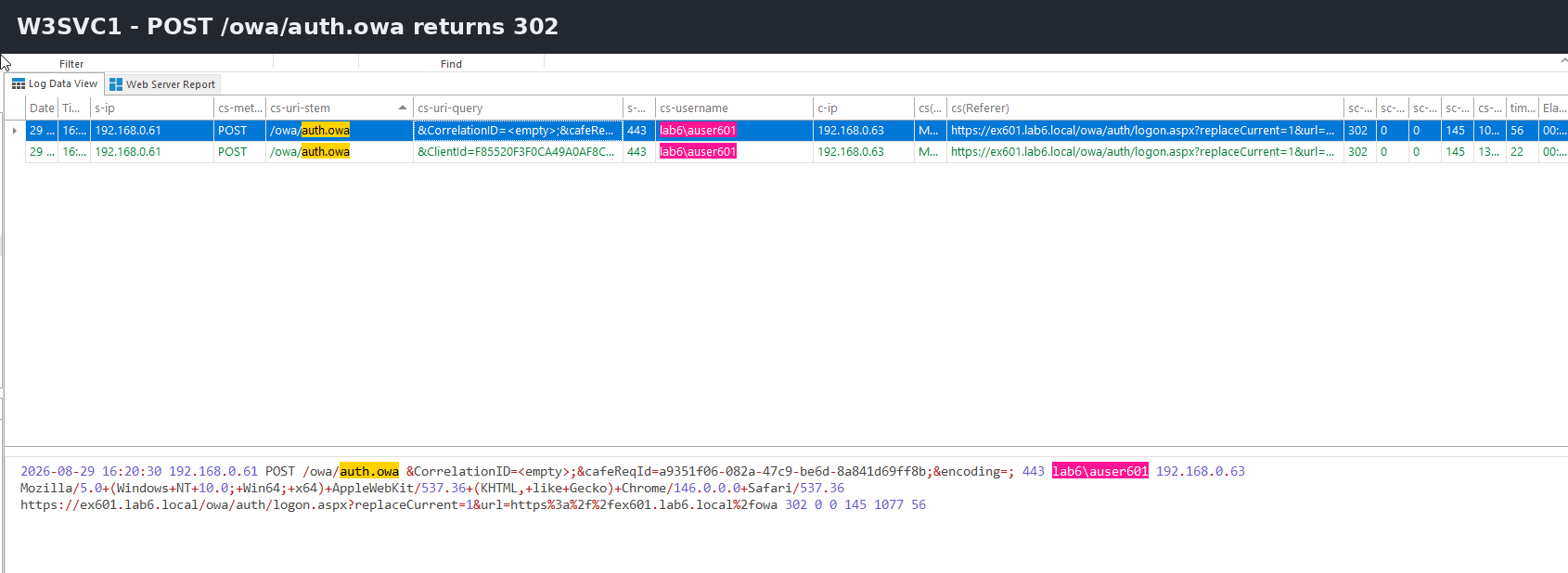
A successful FBA sign-in starts with a POST to /owa/auth.owa. In the frontend IIS log, the important point is that the POST itself returns 302.
W3SVC1
POST /owa/auth.owa  → 302
GET  /owa/...       → application requests continue
The 302 is expected, but it is not proof by itself that the password was correct. We need to see what happens after the redirect.
Figure 1 – The /owa/auth.owa POST returns 302, so the following requests must be checked before calling the sign-in successful.
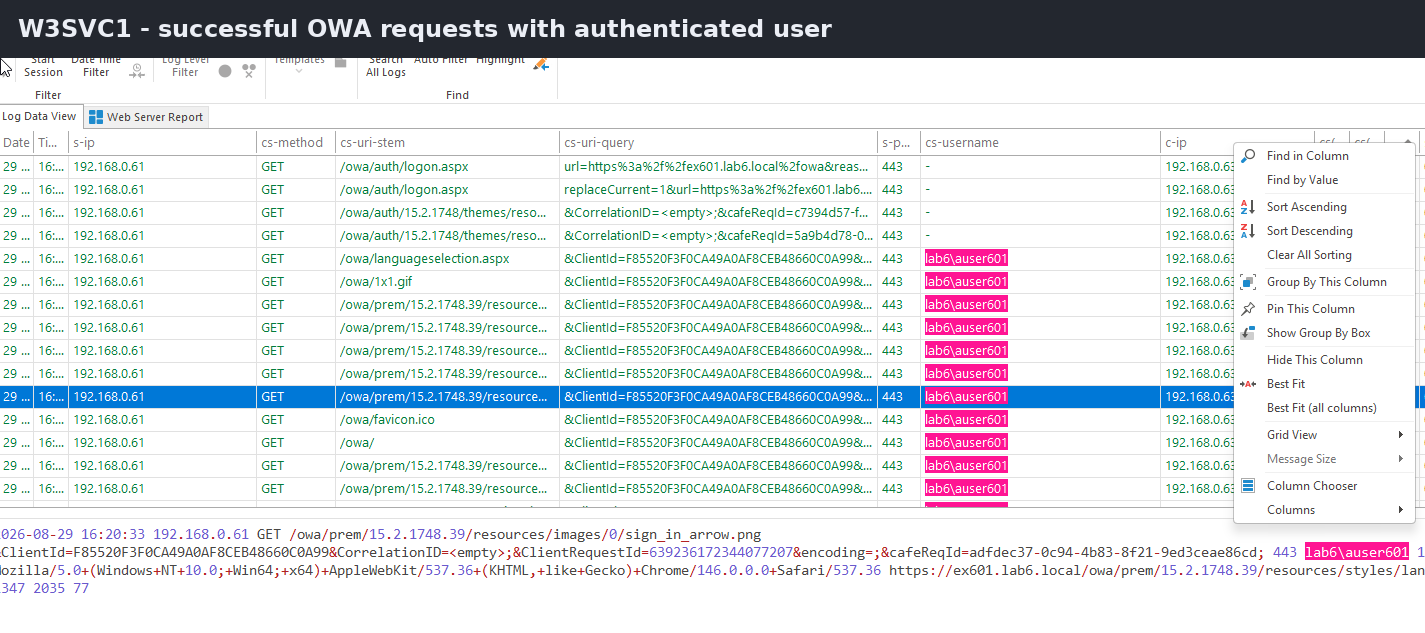
In a successful request, HttpProxy carries the authenticated identity and the backend request completes successfully:
W3SVC2 then shows the user reaching the backend application on port 444:
W3SVC2
GET /owa/default.aspx   444   LAB6\auser601   200
Those three views together are much stronger evidence than the browser simply showing the mailbox.
Figure 2 – After successful FBA, the authenticated user continues into normal OWA requests that return HTTP 200.
5. Case 2 – Invalid Password
The failed-password test is useful because it shows why a 302 from auth.owa is easy to misread.
The frontend still returned 302 for the POST:
POST /owa/auth.owa → 302
But the next logon request contained a different clue:
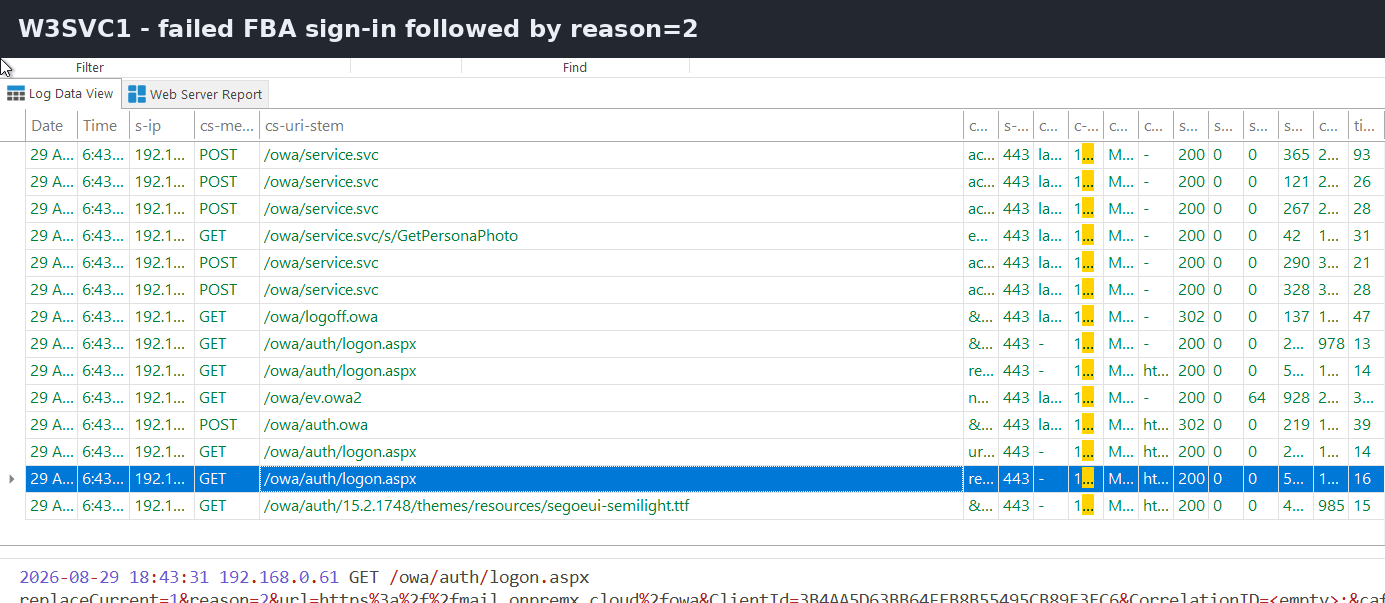
GET /owa/auth/logon.aspx?...reason=2...
In this controlled test, reason=2 matched the intentionally incorrect password. So the correct interpretation is not “302 means authentication succeeded.” The interpretation is “Exchange processed the form submission and redirected the browser; inspect the following requests to determine the result.”
Figure 3 – The failed-password test is identified by the later logon request containing reason=2.
6. Case 3 – Frontend Authentication Succeeds, Backend Authentication Fails
This is the most useful comparison because the browser can make it look like a login failure even though the frontend already accepted the user credentials.
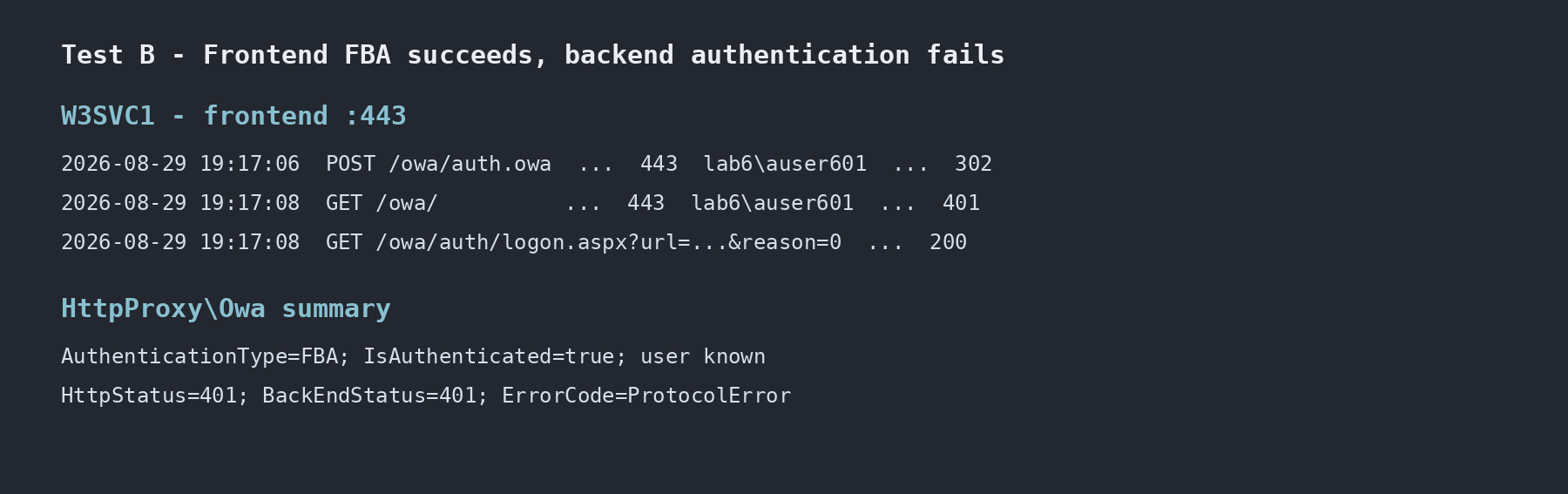
With backend Windows Authentication disabled in Part 3, the frontend sequence was:
W3SVC1
POST /owa/auth.owa                       → 302
GET  /owa/                               → 401
GET  /owa/auth/logon.aspx?...reason=0... → 200
This is the key evidence. Exchange still knew the authenticated user, but the proxied backend request failed with 401.
RoutingHint=WindowsIdentity is useful routing metadata, but I do not treat it as proof that the request used NTLM or Kerberos. Authentication-package verification needs provider configuration plus protocol evidence such as a Kerberos service ticket or an appropriate trace.
W3SVC2 confirmed the same failure boundary:
W3SVC2
GET /owa/   444   -   401
The frontend credential check and the backend request are therefore separate troubleshooting steps. A user can pass the first and fail the second.
Figure 4 – Frontend FBA can succeed while the proxied backend request fails with HTTP 401.
7. Do Not Interpret cs-username by Itself
The IIS cs-username field is useful, but it is not a direct label for the IIS authentication provider.
During the backend Anonymous-off test, /owa/exhealth.check still returned HTTP 200 while cs-username was -:
/owa/exhealth.check 444 - 200
Anonymous Authentication was disabled at that moment, so the dash cannot be used as proof that Anonymous Authentication handled the request.
The safe rule is simple: use cs-username as one observation, then correlate it with the IIS configuration, HttpProxy fields, request URI, and surrounding requests.
8. 401 and 302 Both Need Context
Observation
What it can mean
What it does not prove
302 from /owa/auth.owa
Exchange accepted the form submission and redirected
That the password was valid
401 on frontend
Final auth failure or part of an authentication challenge
That authentication is permanently broken
401 on backend
Backend could not accept or complete the proxied request
That the frontend rejected the password
cs-username = –
No authenticated username was written in that IIS log field
That Anonymous Authentication was used
This is why I avoid troubleshooting OWA by filtering only for “401” and assuming every result means the same thing.
9. A Practical Correlation Order
For a real OWA sign-in problem, I would work in this order:
1. Find the client request in W3SVC1
2. Note timestamp, URI, status, client IP and user-agent
3. Find the same time window in HttpProxy\Owa
4. Check AuthenticationType, IsAuthenticated and AuthenticatedUser
5. Compare HttpStatus with BackEndStatus
6. Check the matching W3SVC2 request on port 444
7. Only then decide whether the problem is frontend auth, proxy/routing, or backend auth
Health probes, localhost traffic, and HealthMailbox requests can create a lot of noise. Client IP, user-agent, URI, and a narrow timestamp window are usually the quickest way to keep the test request separate.
10. Key Takeaways
A 302 from /owa/auth.owa is not enough to declare a successful login.
In the bad-password test, the later logon request carried reason=2.
In the backend authentication failure test, valid FBA credentials were already accepted while HttpProxy and W3SVC2 both showed backend 401.
reason=0 and reason=2 were useful because they were correlated with the surrounding logs, not treated as a standalone error-code catalog.
cs-username=- does not identify the authentication provider by itself.
W3SVC1, HttpProxy, and W3SVC2 together provide a much clearer failure boundary than any one log alone.
Next: Managed Availability and OWA health probes
Part 5 will separate real user traffic from Exchange Managed Availability. We will look at exhealth.check, SelfTest, DeepTest, OWADEEPTEST, EACBACKENDLOGON, and HealthMailbox traffic, including the backend 401 challenge sequence and the unusual 241 IIS status captured during the tests.
Exchange Server OWA Authentication Deep Dive Series
Cloud and infrastructure professional with nearly two decades of experience in enterprise IT environments, spanning public cloud, private cloud, and hybrid architectures.