How to Restore Exchange 2010 Mailbox to Different Mailbox

How to Restore Exchange 2010 Mailbox to Different Mailbox

Exchange, Video Tutorials
Exchange 2010 no longer has the notion of Storage Groups, which were used in Exchange 2007 and 2003 to contain logical groupings of databases. Exchange 2010 now simply lets you create databases on mailbox servers. The difference is that in Exchange 2003/2007, you created a Recover Storage Group (RSG) to restore the database into. In Exchange 2010, you simply restore the database and connect to it as a Recovery Database (RDB). First,  you have to have a good backup that contains the item to be recovered. Windows Server 2008 and Windows Server 2008 R2 have the built-in Windows Server Backup feature. I cover how to use Windows Server Backup to backup Exchange in this article. Without the ability to restore an individual mailbox, it is necessary to first restore an entire…
Read More
How to Configure Windows 2008 Fine-Grained Password Policy

How to Configure Windows 2008 Fine-Grained Password Policy

Active Directory, Identity, Video Tutorials
In previous versions of Active Directory, we had only one password policy for the entire domain. Some companies had to use multiple domains to place different password policies on different users or buy third party solutions. In Windows Server 2008, you can use fine-grained password policies to specify multiple password policies and apply different password restrictions and account lockout policies to different sets of users within a single domain. Password polices are designed to control what kind of password a user can have and how often the user needs to change it. Strong password policies are important to help protect your system and data.
Read More
Iomega StorCenter NAS ix4-200d Initial Configuration

Iomega StorCenter NAS ix4-200d Initial Configuration

Storage
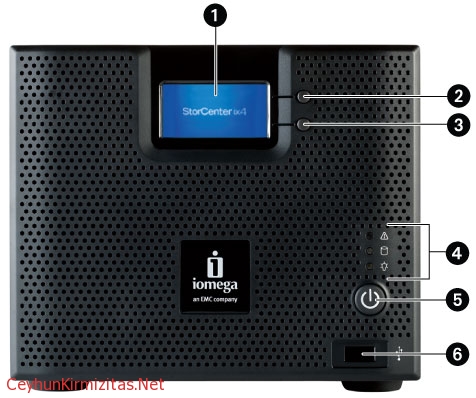
This article provides step-by-step instructions for the initial setup of your device. If you are configuring more than one StorCenter, completely configure one device before starting up the next device. 1- The StorCenter Manager opens automatically to begin the Device Setup Wizard. Click Next to start the Device Setup. If the StorCenter Manager software does not detect the storage device, the Hardware Setup Wizard screen displays explaining how to properly connect the wiring. Once communication is established, the Device Setup Wizard begins. Click Next to start the Device Setup. 2- Identify your storage device on the network. Enter the following information and click Next to continue: Storage Device Name: Enter a name to identify the StorCenter device on your network. The device name should be unique and cannot include, spaces,…
Read More
The replica of Exchange Mailbox Database is inconsistent – Data Protection Manager 2010

The replica of Exchange Mailbox Database is inconsistent – Data Protection Manager 2010

System Center
Description: The replica of Exchange Mailbox Database on ExchangeServerNameFQDN is inconsistent with the protected data source. All protection activities for data source will fail until the replica is synchronized with consistency check. You can recover data from existing recovery points, but new recovery points cannot be created until the replica is consistent. Data consistency verification check failed for LOGS of Exchange Mailbox Database on ExchangeServerNameFQDN. (ID 30146 Details: Unknown error (0xc0000135) (0xC0000135)) Recommended action: Copy " eseutil.exe and ese.dll " from Exchange Server " C:\Program Files\Microsoft\Exchange Server\V14\Bin " to the DPM server " C:\Program Files\Microsoft DPM\DPM\bin " folder.
Read More
Install and Configure VSFTPD FTP Server – RHEL 6 – CentOS 6

Install and Configure VSFTPD FTP Server – RHEL 6 – CentOS 6

Red Hat - CentOS - Fedora, Video Tutorials
When you think of transferring files, you probably think of the File Transfer Protocol (FTP) because it has been around for so long. While simple to use, FTP has become obsolete because it lacks the ability for secure file transfers. vsftpd (Very Secure File Transport Protocol Daemon) is a secure, fast FTP server for Unix/Linux systems. Steps: 1. Install vsftpd yum install vsftpd 2. Enable vsftpd service chkconfig vsftpd on 3. Start vsftpd service service vsftpd start 4. Check ftp port netstat -ntl | grep 21 5. Test ftp server access FTP server is running and anonymous access is enabled by default 6. Disable anonymous access Edit /etc/vsftd/vsftpd.conf anonymous_enable=NO 7. Enable dual logging dual_log_enable=YES It created /var/log/vsftpd.log file which uses vsftpd log format 8. Enable server time for display of…
Read More
How to Perform Windows Server 2008 DC Deployment from IFM Media

How to Perform Windows Server 2008 DC Deployment from IFM Media

Active Directory, Identity, Video Tutorials
Install from media (IFM) was first introduced in Windows Server 2003. We can use the Install from media (IFM) option to install an Additional Domain Controller in an existing domain is the best option such as a branch office scenario. IFM option is the best for deployment Additional Domain Controller at the branch office which will minimize replication traffic during the Installation. Using the IFM method, you can dramatically reduce the amount of replication traffic that is introduced during the installation of an additional DC. Only objects that were modified, added, or deleted since the installation media was created will be replicated.
Read More
How to Manage Local Password Policy on Windows Server 2008 Core

How to Manage Local Password Policy on Windows Server 2008 Core

Video Tutorials, Windows Server
Windows Server 2008 Core is a minimal server installation option for computers running on the Windows Server 2008 operating system. Server Core provides a low-maintenance server environment with limited functionality. Windows Server 2008 Core supports the following server roles: Active Directory Domain Services (AD DS) Active Directory Lightweight Directory Services (AD LDS) DHCP Server DNS Server File Services Print Services Streaming Media Services Internet Information Services (IIS) Virtualization Local Security Policy allows enforcing many system, user and security-related settings, such as password policy, audit policy and user rights. Event Viewer can then be used to check log events.
Read More
Wake on Lan (WOL) Does NOT Work After Upgrading to Windows 10 from Windows 8.1 or Windows 7

Wake on Lan (WOL) Does NOT Work After Upgrading to Windows 10 from Windows 8.1 or Windows 7

Windows 10
What is Wake on LAN (WOL): It is powerful and convenient feature that enables users to remotely power up their computer over a network, saving energy while also allowing remote access to the computer when needed. Problem: Wake on LAN (WOL) stopped working after upgrading to Windows 10 from Windows 8.1 or Windows 7. In my case, I use Realtek PCIe GBE Family Controller. Even though I did all settings for WOL such as  disabling turn on fast startup, configuring adapter options related to WOL, and etc, WOL is not working. My environment: Previous OS: Windows 8.1 Pro x64 Current OS: Windows 10 Pro x64 Mainboard: Asus H87-Plus NIC: Onboard Realtek PCIe GBE Family Controller NIC driver version: 9.1.401.2015 released on April 1, 2015 Cause: Realtek Ethernet Card driver that comes with Windows update…
Read More
How to Install VMware vSphere vCenter Server 5.1.0b on Windows Server 2003 R2 X64 SP2

How to Install VMware vSphere vCenter Server 5.1.0b on Windows Server 2003 R2 X64 SP2

Video Tutorials, vSphere
One of most important components of the vSphere environment is vCenter Server. vCenter Server acts as a central management point for managing ESXi hosts. In this video we will install VMware vSphere vCenter Server 5.1.0b using the Simple Install method on Windows Server 2003 R2 X64 SP2. Minimum requirements for the vCenter server Processor: Intel or AMD x86 processor with two or more logical cores, each with a speed of at least 2GHz. Memory: 4GB RAM. RAM requirements may be higher if your database runs on the same machine. Disk storage: 4GB. Disk requirements may be higher if the vCenter Server database runs on the same machine. Supported operating systems Microsoft Windows Server 2003 SP2 64bit Microsoft Windows Server 2003 SP2 64bit Microsoft Windows Server 2008 SP2 64bit Microsoft Windows…
Read More