Summary: OWA logon format settings define the documented sign-in format, while the lab showed that some alternate identity formats could still be accepted. In this final part, we compare FullDomain, UserName, PrincipalName, and DefaultDomain, then turn the findings from the full series into a practical OWA authentication troubleshooting workflow.
OWA incidents become much slower when troubleshooting starts by changing settings instead of first locating the failure. This final part turns the series into a practical workflow: start from the symptom, identify the correct Exchange layer and evidence, and only then decide what needs to be changed.
Part 2: Forms-Based and Basic Authentication – What Really Changes?
Part 3: Frontend vs Backend Authentication – Controlled A/B Tests
Part 4: Troubleshooting OWA Authentication with IIS and HttpProxy Logs
Part 5: Managed Availability and OWA Health Probes
Part 6: Windows Authentication, NTLM, Kerberos, SPNs and SSO
Part 7: LogonFormat, DefaultDomain and Troubleshooting Playbook — you are here
This final part brings the series back to its practical purpose: reduce uncertainty before changing production and locate the failure before making additional changes. The controlled lab results are evidence for understanding behavior and building a repeatable troubleshooting method, not automatic production recommendations.
Part 6 finished the Windows Authentication branch. This last part returns to Forms-Based Authentication and focuses on the username side of the sign-in process.
For log correlation during troubleshooting, see Part 4. For Managed Availability traffic that can appear beside real user requests, see Part 5.
LogonFormat and DefaultDomain tests
Start from the normal FBA baseline
The baseline used throughout the series was:
FormsAuthentication          : True
BasicAuthentication          : True
WindowsAuthentication        : False
DigestAuthentication         : False
LogonFormat                  : FullDomain
DefaultDomain                :
InternalAuthenticationMethods: {Basic, Fba}
ExternalAuthenticationMethods: {Fba}
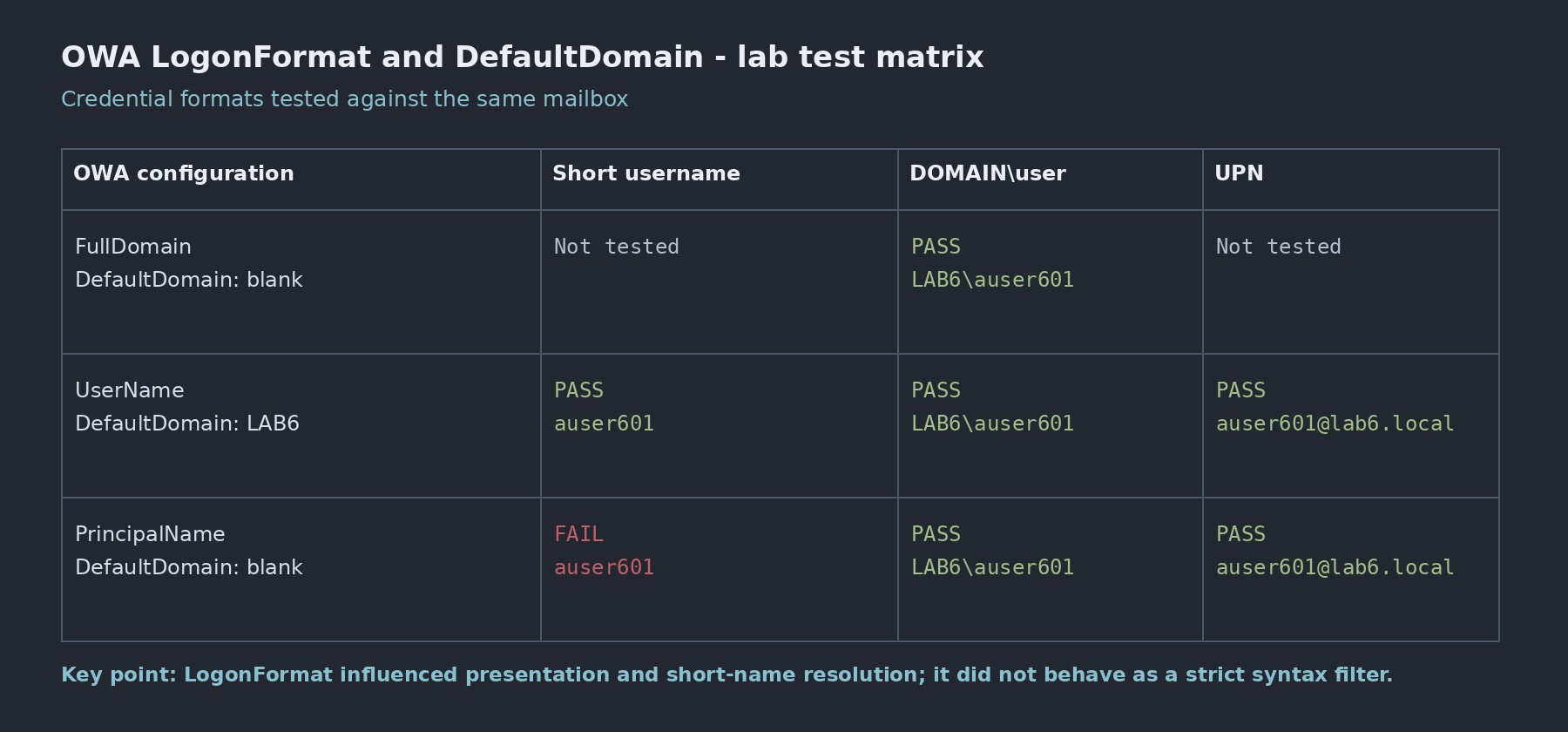
Microsoft documents FullDomain, UserName, and PrincipalName as required FBA logon formats. The tests below also record what the lab actually accepted. Where the observed behavior was broader than the documented format, I treat that as a lab observation rather than a guaranteed input contract.
Test 1 – UserName with DefaultDomain
I first changed OWA so that users could enter a short username and Exchange would have a default Windows domain to resolve it against.
Set-OwaVirtualDirectory -Identity "EX601\owa (Default Web Site)" -LogonFormat UserName -DefaultDomain LAB6After the IIS restart requested by Exchange, I tested three sign-in forms:
| Input | Result |
|---|---|
auser601 | Worked |
LAB6\auser601 | Worked |
| UPN format | Worked |
The useful conclusion is that UserName plus DefaultDomain allows the short name to be resolved cleanly, but it does not force every user to type only the short name.
Test 2 – PrincipalName
Next I switched the logon format to PrincipalName and removed the default domain value.
Set-OwaVirtualDirectory -Identity "EX601\owa (Default Web Site)" -LogonFormat PrincipalName -DefaultDomain $nullThe results were different:
| Input | Result |
|---|---|
| UPN format | Worked |
LAB6\auser601 | Worked |
auser601 | Failed |
Documented behavior vs. observed lab behavior: Microsoft documents PrincipalName as the UPN-based logon format and notes that the user’s UPN should match the email address. In this lab, LAB6\auser601 was also accepted while the short username failed. I treat that broader acceptance as a lab observation, not as a guaranteed input contract. For production configuration and troubleshooting, PrincipalName should still be validated against the documented UPN behavior. Microsoft Learn: Set-OwaVirtualDirectory
Restore the baseline
After the tests, I returned OWA to the original FBA logon format.
Set-OwaVirtualDirectory -Identity "EX601\owa (Default Web Site)" -LogonFormat FullDomain -DefaultDomain $null -FormsAuthentication $true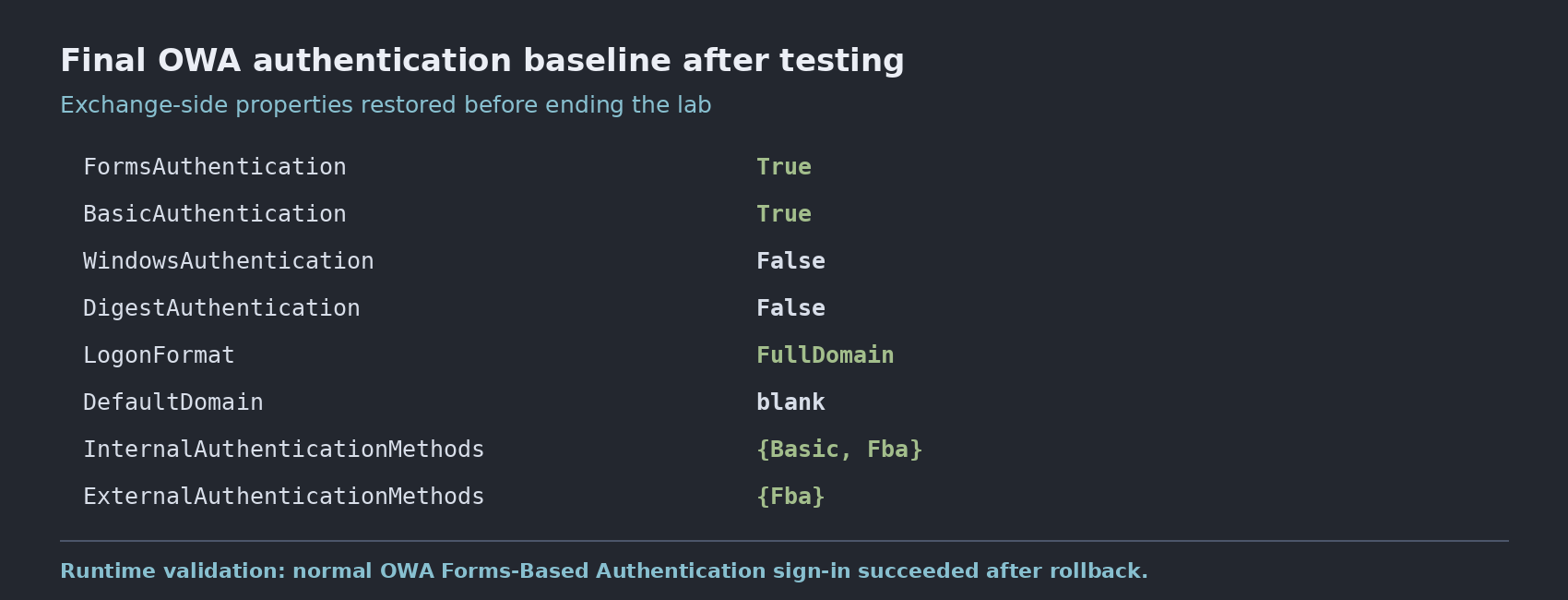
A practical OWA authentication troubleshooting playbook
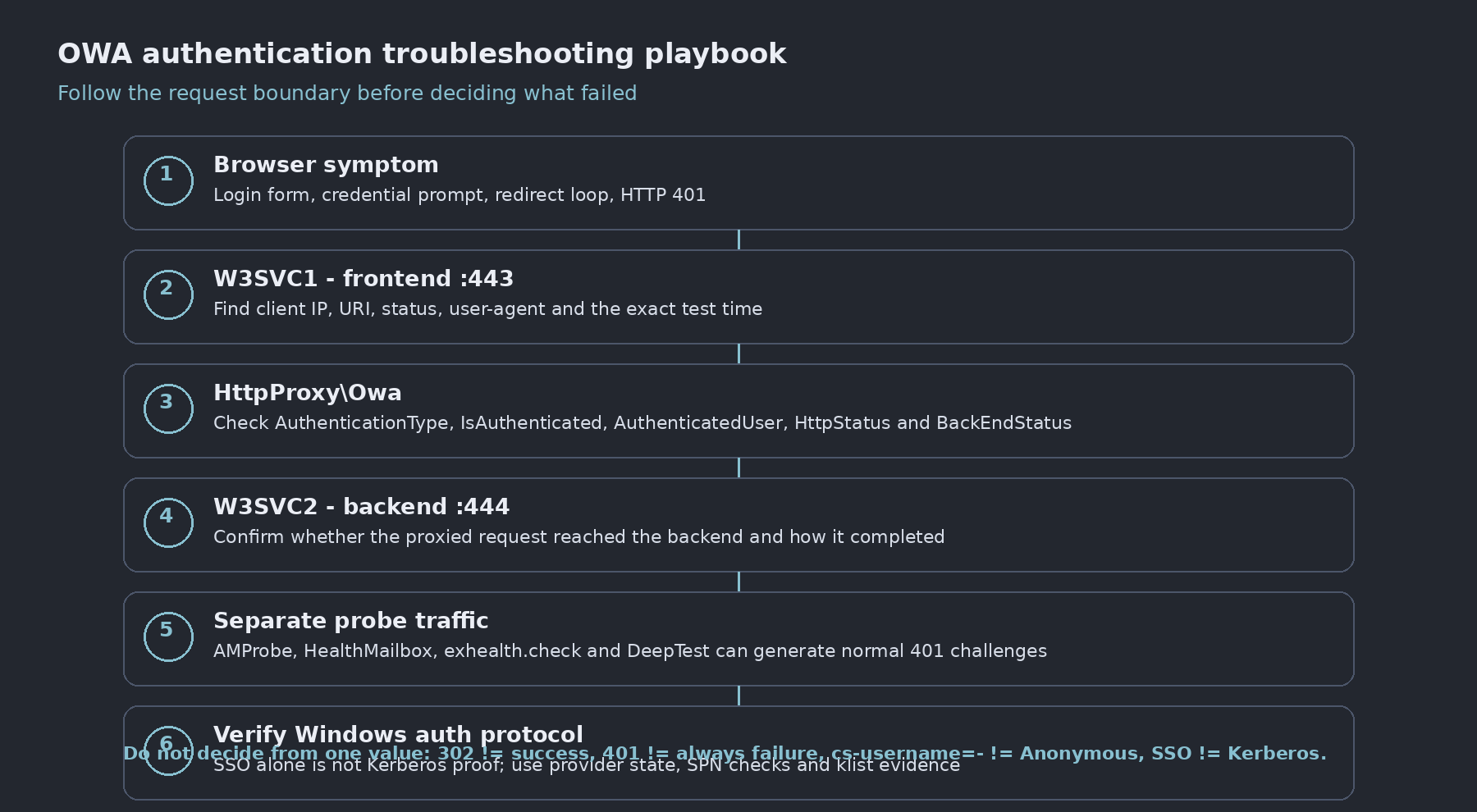
The most useful result from the full series is not one setting. It is a troubleshooting order that keeps the frontend, proxy layer, backend, health probes, and Windows protocol evidence separate.
Troubleshooting order
- Capture the Exchange OWA authentication properties.
- Confirm the frontend IIS authentication state.
- Reproduce one clean user test.
- Find the request in
W3SVC1. - Correlate the same time window in
HttpProxy\Owa. - Compare
HttpStatusandBackEndStatus. - Confirm the matching backend request in
W3SVC2. - Separate Managed Availability traffic from user traffic.
- If Windows Authentication is involved, verify NTLM or Kerberos with protocol evidence.
- Restore Microsoft defaults before concluding the test.
Where to look based on the symptom
| Symptom | First place I would check | Why |
|---|---|---|
| OWA immediately returns 401 after an auth change | Frontend IIS + OWA auth properties | No usable frontend auth method may be enabled |
| FBA form accepts credentials but browser returns to logon | W3SVC1 + HttpProxy | Frontend authentication may have succeeded while proxy/backend failed |
reason=2 | Surrounding frontend requests | In the controlled test this matched invalid credentials |
reason=0 after valid FBA | HttpProxy + W3SVC2 | In the controlled test this matched backend authentication failure |
| Many backend 401 entries | Sequence, URI, identity, User-Agent | They may be Windows challenges or Managed Availability traffic |
cs-username=- | IIS config + surrounding requests | The dash does not identify the auth provider |
| Browser signs in automatically | Windows provider list + klist | SSO alone does not prove Kerberos |
| Kerberos-only causes a prompt | HTTP SPN ownership + Kerberos prerequisites | The service ticket may not be obtainable; also verify client/DC reachability, name resolution, time, and browser integrated-auth conditions |
| Short username fails | LogonFormat + DefaultDomain | Name resolution may be the issue rather than the password |
The log map I keep in mind
Client / browser
      ↓
W3SVC1
Frontend IIS :443
      ↓
HttpProxy\Owa
Exchange auth + proxy context
      ↓
W3SVC2
Exchange Back End :444
For user-authentication problems, the most useful fields are usually timestamp, URI, status, client IP, user-agent, authenticated user, AuthenticationType, IsAuthenticated, HttpStatus, and BackEndStatus.
For health traffic, I add probe names, HealthMailbox identity, regular timing, and synthetic-test URIs to the picture before treating a 401 as a fault.
Things I do not infer from one value
- 302 from
/owa/auth.owadoes not prove the password was correct. - 401 does not always mean the final authentication result was failure.
cs-username=-does not prove Anonymous Authentication.WindowsAuthentication=Truedoes not prove Kerberos.- Automatic browser sign-in does not prove Kerberos.
ExternalAuthenticationMethodsdoes not prove how the site is published to the internet.LogonFormatshould be interpreted from both the documented required format and the observed request behavior; in these lab tests, some alternate identity formats were still accepted.
What this series did not prove
- The
reason=0andreason=2observations are not a universal OWA error-code dictionary. They describe the controlled scenarios reproduced in this lab. - Standard IIS W3C logs do not identify the authentication package by themselves. Kerberos and NTLM need additional protocol evidence.
- The fact that the tested OWA flows still worked with backend Anonymous Authentication disabled does not mean Anonymous should be disabled in production. The documented backend defaults and support boundary still apply.
- The tests were not an exhaustive validation of every OWA endpoint, probe, proxy, load-balanced design, or authentication combination.
The distinction matters: a lab observation is evidence for troubleshooting, not automatically a production recommendation.
Common OWA authentication questions
Does a 401 always mean OWA authentication failed?
No. A 401 can be part of an authentication challenge, backend flow, or Managed Availability traffic. Check the full request sequence before treating it as the final result.
Does WindowsAuthentication=True prove Kerberos?
No. Windows Authentication can use NTLM or Kerberos. Use protocol evidence such as Kerberos tickets and SPN validation to confirm which method was actually used.
Does LogonFormat guarantee that other username formats will fail?
No. LogonFormat defines the documented sign-in format. In this lab, some alternate identity formats were still accepted, so production troubleshooting should start from the documented format and then verify observed behavior.
Final takeaway
OWA authentication becomes much easier to reason about once the request is split into layers. The browser-facing authentication method, the Exchange proxy context, the backend authentication method, Managed Availability, and Windows protocol selection are related, but they are not the same thing.
The reliable approach is to change one variable at a time, capture the request across the relevant layers, and only then decide where the failure occurred. That is much safer than treating a browser prompt, a 302, a 401, or one IIS field as the whole story.
Exchange Server OWA Authentication Deep Dive Series
- Part 1: How OWA Authentication Really Works
- Part 2: Forms-Based and Basic Authentication – What Really Changes?
- Part 3: Frontend vs Backend Authentication – Controlled A/B Tests
- Part 4: Troubleshooting OWA Authentication with IIS and HttpProxy Logs
- Part 5: Managed Availability and OWA Health Probes
- Part 6: Windows Authentication, NTLM, Kerberos, SPNs and SSO
- Part 7: LogonFormat, DefaultDomain and Troubleshooting Playbook — current
References
- Set-OwaVirtualDirectory – Microsoft Learn
- Default settings for Exchange virtual directories – Microsoft Learn
- Client Access services in Exchange Server – Microsoft Learn

Cloud and infrastructure professional with nearly two decades of experience in enterprise IT environments, spanning public cloud, private cloud, and hybrid architectures.