Installing and Configuring Data Protection Manager 2010 for Exchange Server 2010 SP2

Installing and Configuring Data Protection Manager 2010 for Exchange Server 2010 SP2

Exchange Server, System Center, Video Tutorials
A System Center Data Protection Manager (DPM) 2010 installation includes two primary tasks: installing the DPM prerequisite software and installing the DPM application. The DPM Setup Wizard guides you through the process of specifying the DPM installation settings, and automatically installs the prerequisite software as part of an integrated DPM installation process. Important Note: DPM 2010 is not supported on the Turkish language version of Windows Server 2008 or Windows Server 2008 R2. If the automatic installation of one or more of the DPM prerequisite software products fails, you can install the prerequisite software manually. Before installing DPM, note the following: All computers that you use for your DPM installation must meet at least the minimum hardware and software requirements. DPM Setup stops the Removable Storage service before installing DPM. After you install DPM, you…
Read More
Exchange 2010 Event ID: 4113 MSExchangeRepl Database redundancy health check failed

Exchange 2010 Event ID: 4113 MSExchangeRepl Database redundancy health check failed

Exchange Server
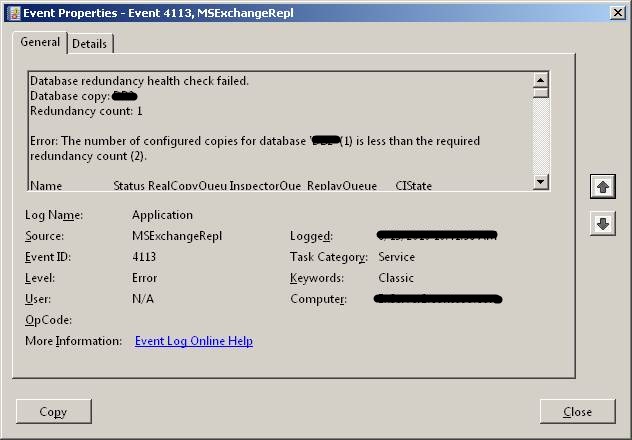
If you are using Database Availability Group (DAG), Microsoft Exchange Replication service monitors database redundancy by calling CheckDatabaseRedundancy.ps1 script in default script folder. It ensures that each replicated database has at least two copies and a healthy copy to make it redundant. CheckDatabaseRedundancy.ps1 script is run hourly by the Microsoft Exchange Replication service to perform a redundancy health check for replicated databases . If Exchange finds that a replicated database doesn?t have sufficient healthy copies, the Microsoft Exchange Replication Service - MSExchangeRepl - logs an event id: 4113 (Error: MSExchangeRepl Database redundancy health check failed) as shown below. The information captured in the event reports that only one copy exists, which is what I expected. The Replication Service will continue to check and log event 4113 for the database every twenty…
Read More
How to Backup and Restore Exchange 2010 Mailbox Database with DPM 2010

How to Backup and Restore Exchange 2010 Mailbox Database with DPM 2010

Exchange Server, System Center, Video Tutorials
DPM 2010 supports the following five types of recovery for Exchange Server 2010 mailbox databases: Recover the database to its original location: Overwrite the existing copy of the database. Recover the database to an alternate database: Restore to another database on an Exchange Server. Recover to an Exchange Recovery database: Recover to an Exchange Recovery database instead of a standard mailbox database. Recover to network location: Copy the database to a network folder. Copy to tape: Create an on-tape copy of the database.
Read More