Applies to: Exchange Server SE / 2019
Microsoft recently published guidance for Exchange Server addressing the May 2026 vulnerability. One important note in the article is related to OWA Light. Microsoft states that OWA Light — accessed by using an OWA URL ending with /?layout=light — does not work properly after the mitigation is applied. Microsoft also notes that this feature was deprecated several years ago and is not intended for regular production use.
For a deeper look at the OWA request path and frontend/backend authentication design, see Exchange OWA Authentication Deep Dive – Part 1.
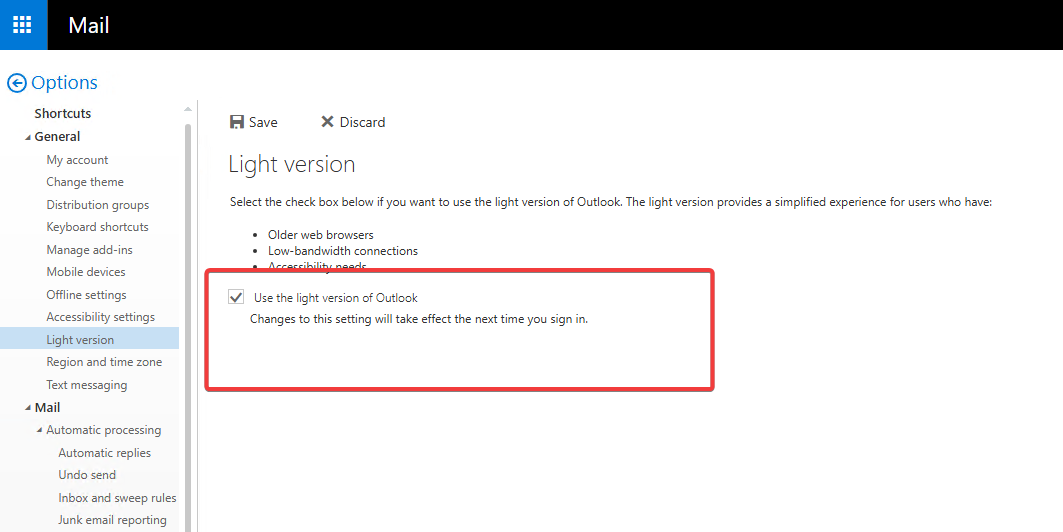
This can become a practical issue if some users previously selected the following option in Outlook on the web:
"Use the light version of Outlook"
When this option is selected, the user may continue to be redirected to the Light version of OWA even when accessing the normal OWA URL.
Example URLs:
https://mail.contoso.com/owa
https://mail.contoso.com/owa/?layout=light
In This Article
- 1. The Issue
- 2. Root Cause
- 3. Quick Remediation Path
- 4. Check a Single User
- 5. Force the User Back to Premium OWA
- 6. Verify the Change
- 7. Find All Users Configured for OWA Light
- 8. Export Affected Users to CSV
- 9. Remediate Affected Users in Bulk
- 10. Key Takeaways
1. The Issue
In the lab I confirmed the following behavior:
- If the user has selected “Use the light version of Outlook”, the
/?layout=PremiumURL does not force the user back to Premium OWA. - Disabling and re-enabling OWA for the mailbox does not reset this user preference either:
Set-CASMailbox user@contoso.com -OWAEnabled $false
Set-CASMailbox user@contoso.com -OWAEnabled $true
The user can still return to OWA Light after signing in again.
2. Root Cause
The user-level OWA Light preference is stored on the mailbox via the following CAS mailbox property:
IsOptimizedForAccessibility
Microsoft documents this parameter as the setting that specifies whether the mailbox is configured to use the light version of Outlook on the web.
True: The mailbox is configured to use OWA Light
False: The mailbox is not configured to use OWA Light
Note: This parameter is functional only in on-premises Exchange. The -ReadIsOptimizedForAccessibility switch is required when reading this property. Without it, the value may not be returned correctly.
3. Quick Remediation Path
- Check
IsOptimizedForAccessibilitywith-ReadIsOptimizedForAccessibility. - If the value is
True, set it toFalsewithSet-CASMailbox. - Ask the user to close the browser completely and sign in again.
- For multiple users, export the affected mailboxes first, review the list, and then remediate them in bulk.
4. Check a Single User
Use the following command to check whether a mailbox is configured for OWA Light:
Get-CASMailbox "auser01@contoso.com" -ReadIsOptimizedForAccessibility | Format-List DisplayName, PrimarySmtpAddress, OWAEnabled, IsOptimizedForAccessibilityIf the output shows:
IsOptimizedForAccessibility : True
the mailbox is configured to use the light version of Outlook on the web.
5. Force the User Back to Premium OWA
To force the user back to Premium OWA, set IsOptimizedForAccessibility to $false:
Set-CASMailbox "auser01@contoso.com" -IsOptimizedForAccessibility $falseThen ask the user to close the browser completely and sign in again. In my test lab, after running this command and reopening the browser, the user was forced back to Premium OWA successfully.
6. Verify the Change
Get-CASMailbox "auser01@contoso.com" -ReadIsOptimizedForAccessibility |
Format-List DisplayName, PrimarySmtpAddress, OWAEnabled, IsOptimizedForAccessibility
Expected result:
IsOptimizedForAccessibility : False
7. Find All Users Configured for OWA Light
Before disabling OWA Light at the policy level, it is useful to identify all users who have already selected the light version.
Get-CASMailbox -ResultSize Unlimited -ReadIsOptimizedForAccessibility |
Where-Object { $_.IsOptimizedForAccessibility -eq $true } |
Select-Object DisplayName, PrimarySmtpAddress, IsOptimizedForAccessibility8. Export Affected Users to CSV
Get-CASMailbox -ResultSize Unlimited -ReadIsOptimizedForAccessibility |
Where-Object { $_.IsOptimizedForAccessibility -eq $true } |
Select-Object DisplayName, PrimarySmtpAddress, IsOptimizedForAccessibility |
Export-Csv C:\Temp\OWA-Light-Users.csv -NoTypeInformation -Encoding UTF89. Remediate Affected Users in Bulk
After reviewing the exported list, you can update all affected users at once:
Import-Csv C:\Temp\OWA-Light-Users.csv |
ForEach-Object {
    Set-CASMailbox $_.PrimarySmtpAddress -IsOptimizedForAccessibility $false
    Write-Host "Fixed: $($_.PrimarySmtpAddress)"
}10. Key Takeaways
OWA Light may cause issues after applying the Exchange Server May 2026 CVE mitigation. Some users may have manually selected the Light version from OWA options. In that case, using /?layout=Premium is not enough to force them back to the full OWA experience.
References
- Addressing Exchange Server May 2026 vulnerability CVE-2026-42897 – Exchange Team Blog
- Get-CASMailbox – Microsoft Learn
- Set-CASMailbox – Microsoft Learn

Cloud and infrastructure professional with nearly two decades of experience in enterprise IT environments, spanning public cloud, private cloud, and hybrid architectures.