How to Install VMware Tools in Ubuntu 13.04 (Raring Ringtail)

How to Install VMware Tools in Ubuntu 13.04 (Raring Ringtail)

Linux, Video Tutorials
VMware Tools is an optional, free set of drivers and utilities that enhances both the performance of a virtual machine’s guest operating system and interaction between the guest and the host. From time to time I find clients have not installed the VMware tools in their virtual machine’s (VM) operating system. I find it more often in Linux VMs than Windows. Installing VMware Tools in the guest operating system is vital. Although the guest operating system can run without VMware Tools, you lose important functionality and convenience. In this video we'll install and configure VMware Tools in Ubuntu 16.04 LTS https://www.youtube.com/watch?v=F5WaWIfi8f8
Read More
How to Reset Password in Ubuntu Linux

How to Reset Password in Ubuntu Linux

Linux
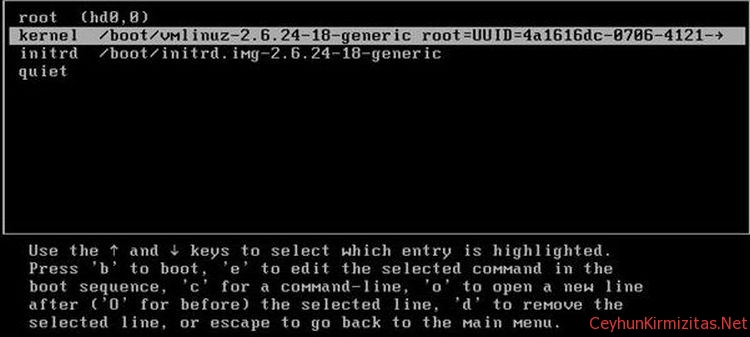
There are many reasons you may need to reset password in Ubuntu Linux: You just installed Ubuntu and forgot what password you selected during the installation. You have too many passwords in your mind. You took Ubuntu from somebody else but you do not know username password. This tutorial shows you how to reset password in Ubuntu Linux. Steps to Reset Ubuntu Password 1. Turn your computer on or Reboot if it is already powered-on. 2. Press ESC at the GRUB prompt. 3. Press e for edit. 4. Highlight the line that begins "kernel ", press e 5. Go to the very end of the line, add rw init=/bin/bash 6. Press enter, then press b to boot your system. Your system will boot up to root shell without prompting password. 7. To reset your password, type passwd…
Read More

Envy: A Fast and Easy Way to Install Video Drivers for Ubuntu

Linux
If you have an advanced Video Card, you can sometimes have trouble installing the drivers. A fast and easy way to install your Video drivers is to use a program called Envy. Envy can help you with your initial installation, and any time you have to reinstall because of a Kernel update. 1- Open your favorite terminal 2- type in sudo apt-get install envyng-gtk 3- Launch EnvyNG's GUI by selecting it in the "Applications/System Tools" menu.
Read More

SSH Connection: Wait long after entering username – ssh password prompt delay

Linux
When I make ssh connection I get long wait just after entering username. It's most likely that ssh daemon  is set up to do a DNS reverse-lookup on the host that's connecting. So, sshd try to find reverse DNS record for a while before prompting you password. If you do not want to wait,  you can either add your client's ip and hostname information to /etc/hosts file on linux or you can disable reverse dns lookup in /etc/ssh/sshd_config 1- Open your terminal window 2- Edit /etc/ssh/sshd_config 3- Add UseDNS no at the end 4- Restart your ssh daemon
Read More